


 That Man Bryn
Hi there,
Is there a way to change the controller screen fps? or is that linked to the fps from the main skin in the app?
Thanks
Is there a way to change the controller screen fps? or is that linked to the fps from the main skin in the app?
Thanks
Posted 18 hours ago
 kradcliffe
What controller?
Posted 18 hours ago
That Man Bryn
Sorry yes a bit more info would help.
Native Instruments Kontrol D2
Native Instruments Kontrol D2
Posted 18 hours ago
kradcliffe
Doesn't say anything in the manual so I'd guess not.
Posted 18 hours ago
That Man Bryn
I looked there aswell and that's what i figured.
My thoughts were if it can be set via the skin for them, like the FPS can be set for the desktop skins.
My thoughts were if it can be set via the skin for them, like the FPS can be set for the desktop skins.
Posted 17 hours ago
kradcliffe
I'm not sure about NI gear but for Denon / Numark etc the SDK limits the transmission speed hence the skins are jaggy and quite unpleasant to use, especially with multiple waveforms.
Posted 17 hours ago
 groovindj
The criticism of Denon never ceases, even in a thread about a Native Instruments product! 🤷♂️
Yes it's been said by Atomix staff that the refresh rate on the Prime screens is low, but I've never noticed anything particularly bad with mine, either using it with VDJ or standalone.
With screens where the GUI gets sent from VDJ, I'd imagine the FPS is the same as the VDJ skin.
Yes it's been said by Atomix staff that the refresh rate on the Prime screens is low, but I've never noticed anything particularly bad with mine, either using it with VDJ or standalone.
With screens where the GUI gets sent from VDJ, I'd imagine the FPS is the same as the VDJ skin.
Posted 17 hours ago
 Adion
Adion
The upper limit is indeed the vdj skin fps, but it can be limited further in the xml of the controller screen skin.
Note that these limits are typically already chosen to be suitable for the controller, so increasing it there will unlikely result in a higher controller screen fps, since the hardware is indeed often the limiting factor there.
Note that these limits are typically already chosen to be suitable for the controller, so increasing it there will unlikely result in a higher controller screen fps, since the hardware is indeed often the limiting factor there.
Posted 17 hours ago
kradcliffe
groovindj wrote :
The criticism of Denon never ceases, even in a thread about a Native Instruments product! 🤷♂️
It's the same deal though, the low data transmission rate limits the FPS. On the Prime Go+ with both waveforms running at the same time it lags like hell.
From what I have read in the past NI screens have the same problem hence it is relevant to this thread.
Posted 17 hours ago
groovindj
Where are you getting the information that the D2 screens have a low refresh rate (or data transmission rate)?
I'm Googling here and not finding anything. In fact Google tells me there's no published info.
Can't find any posts by users complaining either. I did find a ten year old video from Phil Morse showing four stems waveforms scrolling across at once, and that looks OK.
I know DJ legend Francois Kevorkian uses D2s, and until very recently Paul Dakeyne too.
Here's Francois doing live remixing with 8 stem tracks (4 on each screen). I can't imagine he'd be comfortable doing that with jitter or lag.
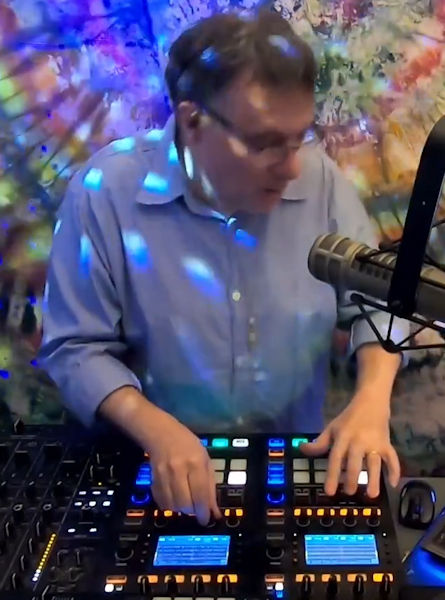
Let me just drop Dakeyne an email and ask...
I'm Googling here and not finding anything. In fact Google tells me there's no published info.
Can't find any posts by users complaining either. I did find a ten year old video from Phil Morse showing four stems waveforms scrolling across at once, and that looks OK.
I know DJ legend Francois Kevorkian uses D2s, and until very recently Paul Dakeyne too.
Here's Francois doing live remixing with 8 stem tracks (4 on each screen). I can't imagine he'd be comfortable doing that with jitter or lag.
Let me just drop Dakeyne an email and ask...
Posted 13 hours ago
That Man Bryn
My D2 screens are great, whether showing 1 deck or 2 at the same time, there is a very slight lag but it's not that noticeable, i'm a bit ocd about the small details so wondered if it could be tightened further. I certainly wouldn't say it was an issue though, the D2s run VDJ very well.
Posted 13 hours ago
That Man Bryn
Adion wrote :
The upper limit is indeed the vdj skin fps, but it can be limited further in the xml of the controller screen skin.
Note that these limits are typically already chosen to be suitable for the controller, so increasing it there will unlikely result in a higher controller screen fps, since the hardware is indeed often the limiting factor there.
Note that these limits are typically already chosen to be suitable for the controller, so increasing it there will unlikely result in a higher controller screen fps, since the hardware is indeed often the limiting factor there.
Do you know how that would be achieved? if it all possible
Posted 13 hours ago
 PhantomDeejay
What Adion meant above, is that even if you set the actual controller skin to render at 120FPS a lot of times the controller can't handle that much frequent updates. Therefore the part of VirtualDJ that communicates with the controller will "ignore" the extra updates and will only send the FPS it knows it works ok with the controller.
That info (how much FPS the controller can handle) is usually hardcoded and you cannot change it.
Therefore you don't really gain anything if you set the skin to render faster than what the controller can handle.
I would say that you actually achieve the opposite. You just waste resources.
Keep in mind that for devices like D2, drawing elements on their screen is done via a Native Instruments "API"
VirtualDJ doesn't talk to the controller directly, and the "API" used needs to "encode" the information and send it on the display.
Even if you somehow could tell VirtualDJ to send data at let's say 120FPS, you risk to flood the input of the API.
If the device can accept and process up to 60 frames per second (as an example) and you try to feed it 120FPS, it is possible that it will try to buffer the data and process all frames sequentially. This means that it may not try to drop the extra frames and instead start lagging until it's buffer gets full..
That info (how much FPS the controller can handle) is usually hardcoded and you cannot change it.
Therefore you don't really gain anything if you set the skin to render faster than what the controller can handle.
I would say that you actually achieve the opposite. You just waste resources.
Keep in mind that for devices like D2, drawing elements on their screen is done via a Native Instruments "API"
VirtualDJ doesn't talk to the controller directly, and the "API" used needs to "encode" the information and send it on the display.
Even if you somehow could tell VirtualDJ to send data at let's say 120FPS, you risk to flood the input of the API.
If the device can accept and process up to 60 frames per second (as an example) and you try to feed it 120FPS, it is possible that it will try to buffer the data and process all frames sequentially. This means that it may not try to drop the extra frames and instead start lagging until it's buffer gets full..
Posted 10 hours ago
That Man Bryn
Ahh ok that makes sense, I appreciate the detailed answer, thank you.
Posted an hour ago