


 Marcel mdg
Hello,
I would like to make a blinking effect to a slider ONLY when the slider is on a hot_cue position.
So not when the slider is on the temporary cue.
I can visualize the hotcue with this second part of the script, but nog blinking when the hotcue is pressed.
See my script below. (this aint working).
<!--blink if active hotcue-->
<slider action="cue_pos" color="cue_color 1" visibility="hot_cue 1? blink 500ms : nothing">
<size width="787" height="100"/>
<pos x="245" y="1590-10-230+55"/>
<fader>
<size width="41" height="41" />
<off color="white"/>
</fader>
</slider>
<!--hotcue on songpos-->
<slider action="cue_pos 1" visibility="hot_cue 1">
<size width="785" height="100"/>
<pos x="245" y="1590-10-230+55"/>
<fader>
<size width="35" height="35" />
<off color="#fd0015"/>
<text font="arial" dx="+0" dy="+0" fontsize="34" align="center" weight="bold" color="black" text="A"/>
</fader>
Any ideas?
gr. Marcel
I would like to make a blinking effect to a slider ONLY when the slider is on a hot_cue position.
So not when the slider is on the temporary cue.
I can visualize the hotcue with this second part of the script, but nog blinking when the hotcue is pressed.
See my script below. (this aint working).
<!--blink if active hotcue-->
<slider action="cue_pos" color="cue_color 1" visibility="hot_cue 1? blink 500ms : nothing">
<size width="787" height="100"/>
<pos x="245" y="1590-10-230+55"/>
<fader>
<size width="41" height="41" />
<off color="white"/>
</fader>
</slider>
<!--hotcue on songpos-->
<slider action="cue_pos 1" visibility="hot_cue 1">
<size width="785" height="100"/>
<pos x="245" y="1590-10-230+55"/>
<fader>
<size width="35" height="35" />
<off color="#fd0015"/>
<text font="arial" dx="+0" dy="+0" fontsize="34" align="center" weight="bold" color="black" text="A"/>
</fader>
Any ideas?
gr. Marcel
Posted Thu 26 Mar 26 @ 6:17 pm
 locoDog
visibility="hot_cue 1? blink 500ms : nothing"
needs a space between hot_cue 1 , ?
needs a space between hot_cue 1 , ?
Posted Thu 26 Mar 26 @ 8:46 pm
Marcel mdg
Hi, i have tried this but didn`t make a difference. When using "hotcue 1 ?" it checks if it has a hotcue and not when the position is on hotcue 1.
I script it in an other way (see below). This time it looks to the position of the cue (hotcue in my case) but the problem is the blinking effect also occur on the tempory cue when i move the slider on the position of the hotcue and only when the track is in pause mode.
If the track is playing and the position goes over the hotcue you don`t notice the blinking.
It would sure not be a big problem, but it gives me deeper knowledge how VDJ skin scripting works.
<!--temporary cue-->
<slider action="cue_pos" color="cue_color 1" visibility="true">
<size width="785" height="100"/>
<pos x="247" y="1590-10-230+53"/>
<fader>
<size width="40" height="40"/>
<off color="alpha"/>
<text font="arial" dx="+0" dy="+0" fontsize="43" align="center" weight="bold" color="red" text="▼"/>
</fader>
</slider>
<!--blink if active hotcue-->
<slider action="cue_pos" color="white" visibility="cue 1 ? blink 400ms : cue 2 ? blink 400ms : cue 3 ? blink 400ms : cue 4 ? blink 400ms :
cue 5 ? blink 400ms : cue 6 ? blink 400ms : cue 7 ? blink 400ms : cue 8 ? blink 400ms :
false">
<size width="779" height="100"/>
<pos x="250" y="1590-10-230+78"/>
<fader>
<size width="34" height="5" />
<off color="white"/>
</fader>
</slider>
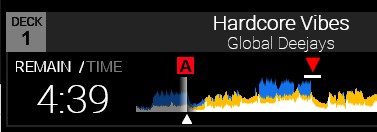
I script it in an other way (see below). This time it looks to the position of the cue (hotcue in my case) but the problem is the blinking effect also occur on the tempory cue when i move the slider on the position of the hotcue and only when the track is in pause mode.
If the track is playing and the position goes over the hotcue you don`t notice the blinking.
It would sure not be a big problem, but it gives me deeper knowledge how VDJ skin scripting works.
<!--temporary cue-->
<slider action="cue_pos" color="cue_color 1" visibility="true">
<size width="785" height="100"/>
<pos x="247" y="1590-10-230+53"/>
<fader>
<size width="40" height="40"/>
<off color="alpha"/>
<text font="arial" dx="+0" dy="+0" fontsize="43" align="center" weight="bold" color="red" text="▼"/>
</fader>
</slider>
<!--blink if active hotcue-->
<slider action="cue_pos" color="white" visibility="cue 1 ? blink 400ms : cue 2 ? blink 400ms : cue 3 ? blink 400ms : cue 4 ? blink 400ms :
cue 5 ? blink 400ms : cue 6 ? blink 400ms : cue 7 ? blink 400ms : cue 8 ? blink 400ms :
false">
<size width="779" height="100"/>
<pos x="250" y="1590-10-230+78"/>
<fader>
<size width="34" height="5" />
<off color="white"/>
</fader>
</slider>
Posted Fri 27 Mar 26 @ 9:57 pm
 PhantomDeejay
You can use something like cue_countdown param_equal 0 `cue_countdown`
This script does not accept cue numbers and returns true when the playhead position is exactly "on any cue" position.
This means that it will return true for temporary cue (cue 0) as well
This script does not accept cue numbers and returns true when the playhead position is exactly "on any cue" position.
This means that it will return true for temporary cue (cue 0) as well
Posted Mon 30 Mar 26 @ 8:40 am
Marcel mdg
Hi,
I would like to let blink the hotcue’s only and not the temporary cue. (When its selected).
When in playing mode you dont see/notice the blinking (maybe its there).
Is there a possibilty to use the countdown query to a hotcue only? Or maybe send an TRUE if the comparison off some script match the position of the hotcue only?
I would like to let blink the hotcue’s only and not the temporary cue. (When its selected).
When in playing mode you dont see/notice the blinking (maybe its there).
Is there a possibilty to use the countdown query to a hotcue only? Or maybe send an TRUE if the comparison off some script match the position of the hotcue only?
Posted Tue 31 Mar 26 @ 10:53 am
PhantomDeejay
What's exactly the desired behavior ?
I gave you a solution to a specific problem, but I don't know what you're actually after.
I understand that you try to mimic some Pioneer gear behavior, but still I can't understand what you want.
So, explain it with as much details as possible if you want me to give a more complete / "copy-paste friendly" solution..
I gave you a solution to a specific problem, but I don't know what you're actually after.
I understand that you try to mimic some Pioneer gear behavior, but still I can't understand what you want.
So, explain it with as much details as possible if you want me to give a more complete / "copy-paste friendly" solution..
Posted Tue 31 Mar 26 @ 11:23 am
Marcel mdg
I hope i can expain it well with the help of this video.
A blinking effect under a hotcue is only wanted when the hotcue`s are selected AND not when a
temporary cue is set (the red triangle).
For that i made this stript, but don`t work.
<!--blink if active hotcue-->
<slider action="cue_pos" color="white" visibility="cue 1 ? blink 400ms : hot_cue 2 ? blink 400ms : cue 3 ? blink 400ms : cue 4 ? blink 400ms :
cue 5 ? blink 400ms : cue 6 ? blink 400ms : cue 7 ? blink 400ms : cue 8 ? blink 400ms :
nothing">
<size width="779" height="100"/>
<pos x="250" y="1590-10-230+78"/>
<fader>
<size width="34" height="5" />
<off color="white"/>
</fader>
</slider>
https://streamable.com/zwgxuk
A blinking effect under a hotcue is only wanted when the hotcue`s are selected AND not when a
temporary cue is set (the red triangle).
For that i made this stript, but don`t work.
<!--blink if active hotcue-->
<slider action="cue_pos" color="white" visibility="cue 1 ? blink 400ms : hot_cue 2 ? blink 400ms : cue 3 ? blink 400ms : cue 4 ? blink 400ms :
cue 5 ? blink 400ms : cue 6 ? blink 400ms : cue 7 ? blink 400ms : cue 8 ? blink 400ms :
nothing">
<size width="779" height="100"/>
<pos x="250" y="1590-10-230+78"/>
<fader>
<size width="34" height="5" />
<off color="white"/>
</fader>
</slider>
https://streamable.com/zwgxuk
Posted Tue 31 Mar 26 @ 5:28 pm
PhantomDeejay
Use this visibility="param_equal 0 `get_cue` ? off : blink 400ms"
Posted Tue 31 Mar 26 @ 10:24 pm
Marcel mdg
Check!! working 100%
Thnx,
Gr. Marcel
Thnx,
Gr. Marcel
Posted Thu 09 Apr 26 @ 4:17 pm