


 Marcel mdg
Hello,
I am settings some things up for a new skin.
When having a square border loading, you see the lowest borderline stuttering, when switching to my testing XML skin. For this i have included a video where you can see this.
https://streamable.com/afe9h5
The XML file is attached below: (red line for the square)
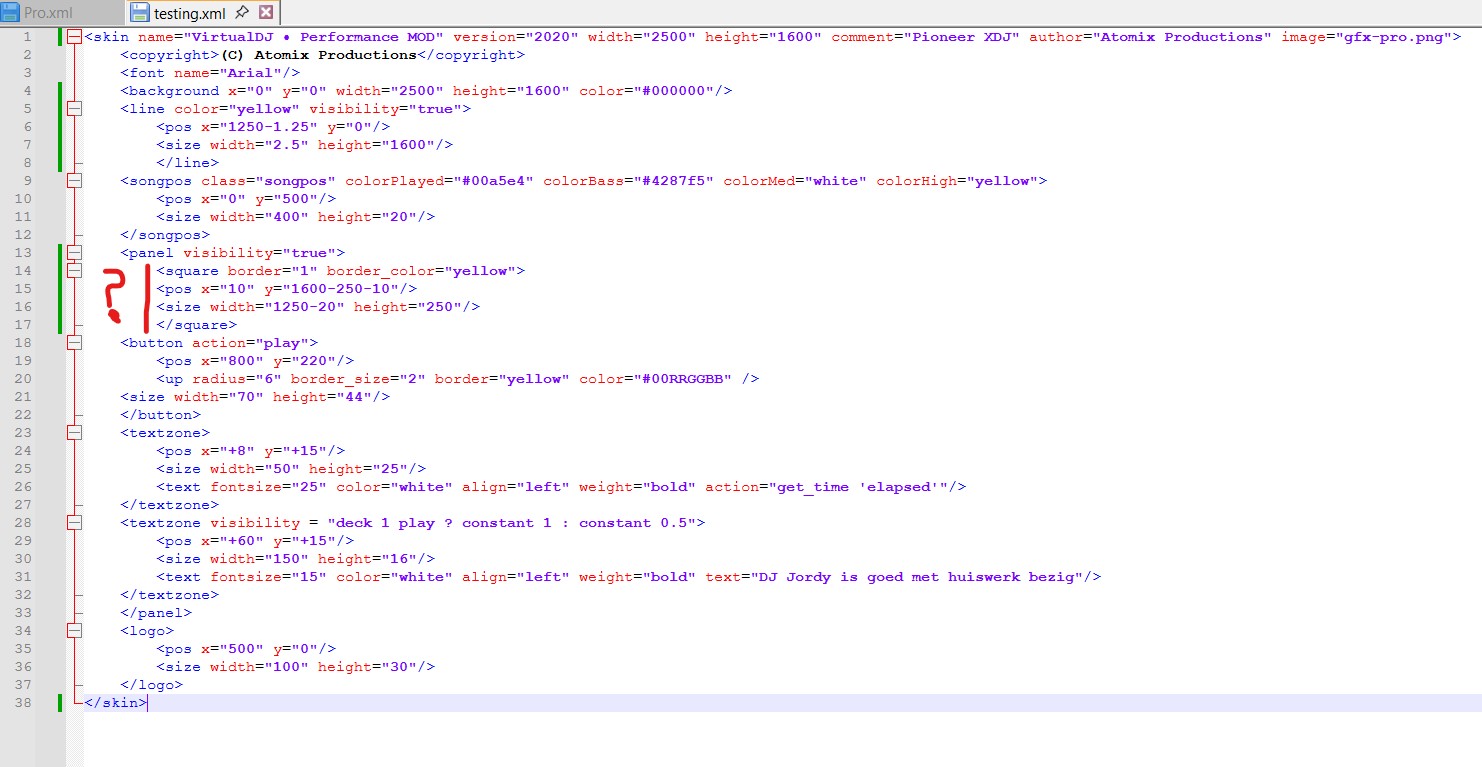
Before working the whole skin out...........a i doing something fundamentally wrong here in the
skin xml file?
gr. Marcel
I am settings some things up for a new skin.
When having a square border loading, you see the lowest borderline stuttering, when switching to my testing XML skin. For this i have included a video where you can see this.
https://streamable.com/afe9h5
The XML file is attached below: (red line for the square)
Before working the whole skin out...........a i doing something fundamentally wrong here in the
skin xml file?
gr. Marcel
Posted Thu 05 Mar 26 @ 6:00 pm
Marcel mdg
Posted Thu 05 Mar 26 @ 8:59 pm
 PhantomDeejay
Since you moved the square on the bottom of the screen, you need to setup properly the skin's breaklines.
Breaklines are used to let VirtualDJ know where it can stretch the skin and where it needs to scale it proportionally.
By default VirtualDJ stretches the bottom area of the skin since that's where the browser usually is.
Finally keep in mind that an element that's only 1 pixel in size, when resized may end up taking less that 1 pixel space on screen. VirtualDJ tries in that case to enforce the element, but that's not the most clean and efficient solution.
In other words, if you plan to resize down your skin from it's native resolution, avoid 1 pixel elements.
Breaklines are used to let VirtualDJ know where it can stretch the skin and where it needs to scale it proportionally.
By default VirtualDJ stretches the bottom area of the skin since that's where the browser usually is.
Finally keep in mind that an element that's only 1 pixel in size, when resized may end up taking less that 1 pixel space on screen. VirtualDJ tries in that case to enforce the element, but that's not the most clean and efficient solution.
In other words, if you plan to resize down your skin from it's native resolution, avoid 1 pixel elements.
Posted Fri 06 Mar 26 @ 9:26 am
Marcel mdg
Setting up the correct breakline solved the artifact, thanks.
I am using the 10.5" external screen. The resolution is 2500x1600.
Is it advisible to work out a skin with this size (resolution) OR use the standard 1920x1080 size?
If have noticed if i take the breakline low enough, in my case 1599 px, the grab zone for resizing dissapear. If i switch to an existing skine, resize it and then switch it back to my "test" skin it takes the size of the previous skin. Is there a way to always load this skin with a predefined size so its matches my external screen?
gr. Marcel
I am using the 10.5" external screen. The resolution is 2500x1600.
Is it advisible to work out a skin with this size (resolution) OR use the standard 1920x1080 size?
If have noticed if i take the breakline low enough, in my case 1599 px, the grab zone for resizing dissapear. If i switch to an existing skine, resize it and then switch it back to my "test" skin it takes the size of the previous skin. Is there a way to always load this skin with a predefined size so its matches my external screen?
gr. Marcel
Posted Fri 06 Mar 26 @ 6:48 pm
 locoDog
skin_width
skin_height
Are the verbs you want.
skin_height
Are the verbs you want.
Posted Fri 06 Mar 26 @ 6:51 pm
Marcel mdg
Still a question about the subject;
With my skin i can`t resize the anymore with the right corner below. I can move it around.
Switching back to Pro original skin i always can resize the skin.
What i have to script to XML file to always have the resize zone in the right corner below.
Below my current XML file.
With my skin i can`t resize the anymore with the right corner below. I can move it around.
Switching back to Pro original skin i always can resize the skin.
What i have to script to XML file to always have the resize zone in the right corner below.
Below my current XML file.
<skin name="VirtualDJ • Performance MOD" version="2020" width="2500" height="1600" comment="Test" author="Atomix Productions" breakline="1590" image="gfx-pro.png">
	<copyright>(C) Atomix Productions</copyright>
	<font name="Roboto"/>
	<background x="0" y="0" width="2500" height="1600" color="#000000"/>
	<resizezone>
		<pos x="2500-50" y="1600-50"/>
		<size width="50" height="50"/>
	</resizezone>

	<group name="grabzones">
		<grabzone>
			<pos x="0" y="0"/>
			<size width="2500" height="48"/>
		</grabzone>
		<grabzone>
			<pos x="0" y="0"/>
			<size width="15" height="1600"/>
		</grabzone>
		<grabzone>
			<pos x="0" y="1600-15"/>
			<size width="2500" height="15"/>
		</grabzone>
		<grabzone>
			<pos x="2500-15" y="0"/>
			<size width="15" height="1600"/>
		</grabzone>
	</group>
	<line color="yellow" visibility="true">
		<pos x="1250-1.25" y="0"/>
		<size width="2.5" height="1600"/>
	</line>
	<songpos class="songpos" colorPlayed="#00a5e4" colorBass="#4287f5" colorMed="white" colorHigh="yellow">
		<pos x="0" y="500"/>
		<size width="400" height="20"/>
	</songpos>
	<panel visibility="true">
		<square border="1" border_color="yellow">
			<pos x="10" y="1200-10-230"/>
			<size width="1250-20" height="230"/>
		</square>
		<button action="play">
			<pos x="250" y="125"/>
			<size width="250" height="125"/>
			<up border_size="1" border="white" color="#00RRGGBB"/>
			<selected border_size="3" border="yellow" color="#aa007a"/>
		</button>
		<textzone visibility="deck 1 play ? constant 1 : constant 0">
			<pos x="350" y="125"/>
			<size width="350" height="125"/>
			<text fontsize="90" color="white" align="left" weight="bold" text="MASTER"/>
		</textzone>
		<button action="play">
			<pos x="800" y="220"/>
			<up radius="6" border_size="2" border="yellow" color="#00RRGGBB"/>
			<size width="70" height="44"/>
		</button>
		<textzone>
			<pos x="+8" y="+15"/>
			<size width="50" height="25"/>
			<text fontsize="25" color="white" align="left" weight="bold" action="get_time 'elapsed'"/>
		</textzone>
		<textzone visibility="deck 1 play ? constant 1 : constant 0.5">
			<pos x="+60" y="+15"/>
			<size width="150" height="16"/>
			<text fontsize="15" color="white" align="left" weight="bold" text="DJ Jordy is goed met huiswerk bezig"/>
		</textzone>
	</panel>
	<logo>
		<pos x="500" y="0"/>
		<size width="100" height="30"/>
	</logo>
</skin>
Posted Tue 10 Mar 26 @ 9:03 pm
locoDog
breakline="1590"
means the skin has only 10 pxl of resizing possible.
means the skin has only 10 pxl of resizing possible.
Posted Tue 10 Mar 26 @ 9:06 pm