


 UweB
UweB
I've noticed a new bug in b9209. When I add new tracks and edit them with cues, tags, etc., the "Reread BPM & Tags" function deletes the existing tags.
(see screenshot)
VDJ also currently doesn't read these tags but seems to only use those in the database.xml file.
This file also appears to be written incorrectly, but I haven't verified this. I haven't yet figured out exactly what triggers what.
VDJ then treats the files as new and starts the scan, which currently means that all changes are lost after closing VDJ.
The cues and loops are also lost.
Furthermore, this update doesn't fix the issue where VDJ doesn't close properly and can only be closed by restarting Windows 11.
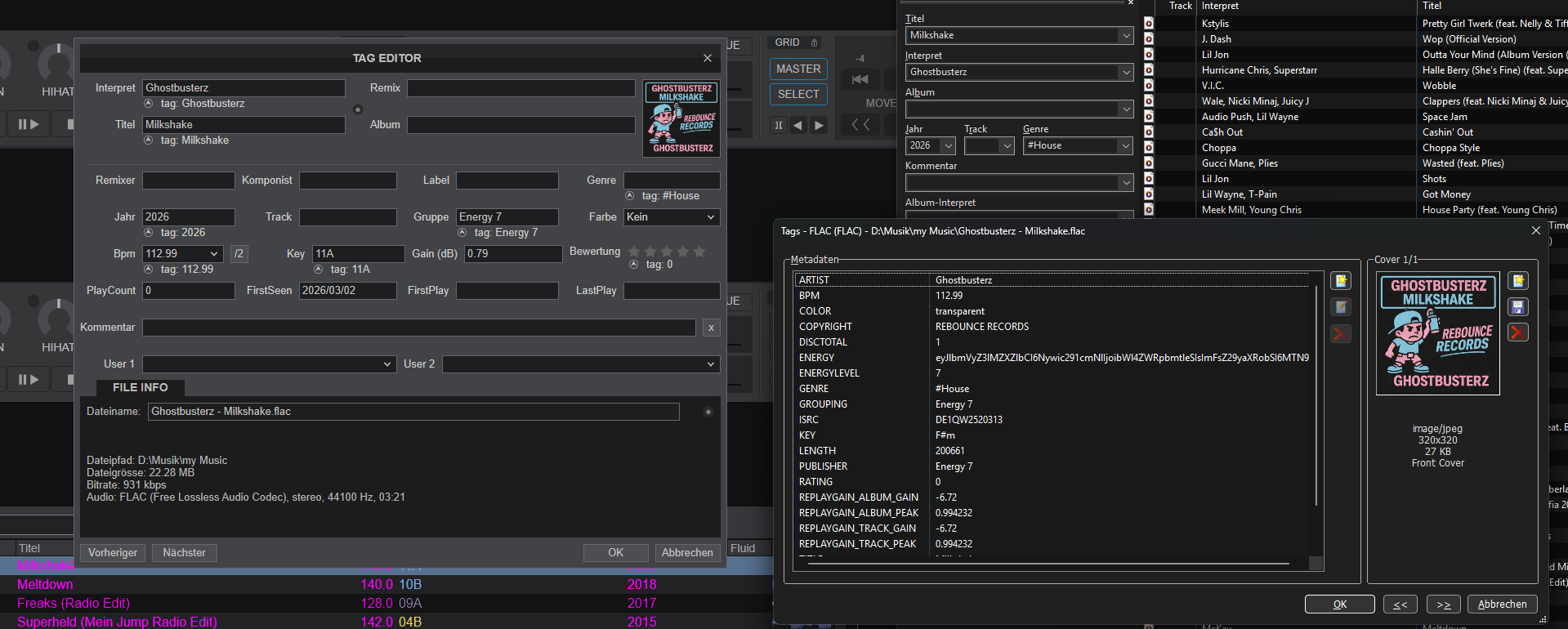
(see screenshot)
VDJ also currently doesn't read these tags but seems to only use those in the database.xml file.
This file also appears to be written incorrectly, but I haven't verified this. I haven't yet figured out exactly what triggers what.
VDJ then treats the files as new and starts the scan, which currently means that all changes are lost after closing VDJ.
The cues and loops are also lost.
Furthermore, this update doesn't fix the issue where VDJ doesn't close properly and can only be closed by restarting Windows 11.
Posted Tue 03 Mar 26 @ 2:36 pm
UweB
A small addition:
0t seems that VDJ simply no longer reads external changes, such as tags, and instead rewrites the track number.
Wherever this comes from – I ALWAYS delete it with mp3Tag BEFORE VDJ even sees this data!
So far, this only affects new files added since the last early version; older files are unaffected.
VDJ also correctly writes the genre tag into the file as usual. However, if I change this in mp3Tag and let VDJ re-read the BPM and tags, it's essentially reset!
Posted Tue 03 Mar 26 @ 3:02 pm
 djdad
djdad
UweB wrote :
... all changes are lost after closing VDJ.
The cues and loops are also lost.
Furthermore, this update doesn't fix the issue where VDJ doesn't close properly and can only be closed by restarting Windows 11.
The cues and loops are also lost.
Furthermore, this update doesn't fix the issue where VDJ doesn't close properly and can only be closed by restarting Windows 11.
This is something u need to take into account. Yes, we are aware of this issue on recent Windows updates and of course can affect some DB savings among others, so best would be to uninstall the latest Win Updates (KB) and see later with proper closing of VirtualDJ if you still have issues.
This article https://www.virtualdj.com/wiki/Win11-KB5074105.html mostly focus on some controllers issue, but applies to not-properly closing VDJ, related to some controller connected and/or sound card. Uninstalling updates is the safest and wisest way for now.
As for the report, if i undersood correctly, we need to see from your images that your Track has proper Track Nr. but VDJ doesnt see it ? Because i dont see your Track having this field in your 3rd party Tag app. Or something else ?
Posted Wed 04 Mar 26 @ 4:19 am
UweB
II've only uninstalled one KB so far, and that didn't help.
I can also uninstall the two others mentioned if they're there.
Database:
No, VDJ is re-entering the track numbers!
The crazy thing is, I don't know where they're coming from!
Before VDJ even sees the data, I delete such irrelevant data. Basically EVERYTHING except the artist, title, and year.
Only then do I start VDJ, and it sees the new files.
For example, if I've already entered a genre using mp3Tag, VDJ doesn't see it anymore!
Not even with BPM and rereading tags!
That's what the image shows.
The tag is set in mp3Tag, but VDJ doesn't see it!
I've noticed that when I then add my tags, loops, etc., in VDJ, the grouping tag is almost always deleted.
The energy value set by MIK is displayed there.
The penultimate version behaved normally.
This only started happening with the current early version.
I'll report back later whether deleting the Windows 11 updates made any difference.
But it's unlikely to affect the database problem.
I can also uninstall the two others mentioned if they're there.
Database:
No, VDJ is re-entering the track numbers!
The crazy thing is, I don't know where they're coming from!
Before VDJ even sees the data, I delete such irrelevant data. Basically EVERYTHING except the artist, title, and year.
Only then do I start VDJ, and it sees the new files.
For example, if I've already entered a genre using mp3Tag, VDJ doesn't see it anymore!
Not even with BPM and rereading tags!
That's what the image shows.
The tag is set in mp3Tag, but VDJ doesn't see it!
I've noticed that when I then add my tags, loops, etc., in VDJ, the grouping tag is almost always deleted.
The energy value set by MIK is displayed there.
The penultimate version behaved normally.
This only started happening with the current early version.
I'll report back later whether deleting the Windows 11 updates made any difference.
But it's unlikely to affect the database problem.
Posted Wed 04 Mar 26 @ 7:33 am
UweB
Unfortunately, there's bad news regarding the VDJ issue: it's not closing properly and requires a Windows restart.
I uninstalled all the suggested KB updates, and now it also reports that they are no longer present when I do it via CMD.
Unfortunately, this didn't help.
The MIDI Check tool still reports that version 2 is installed.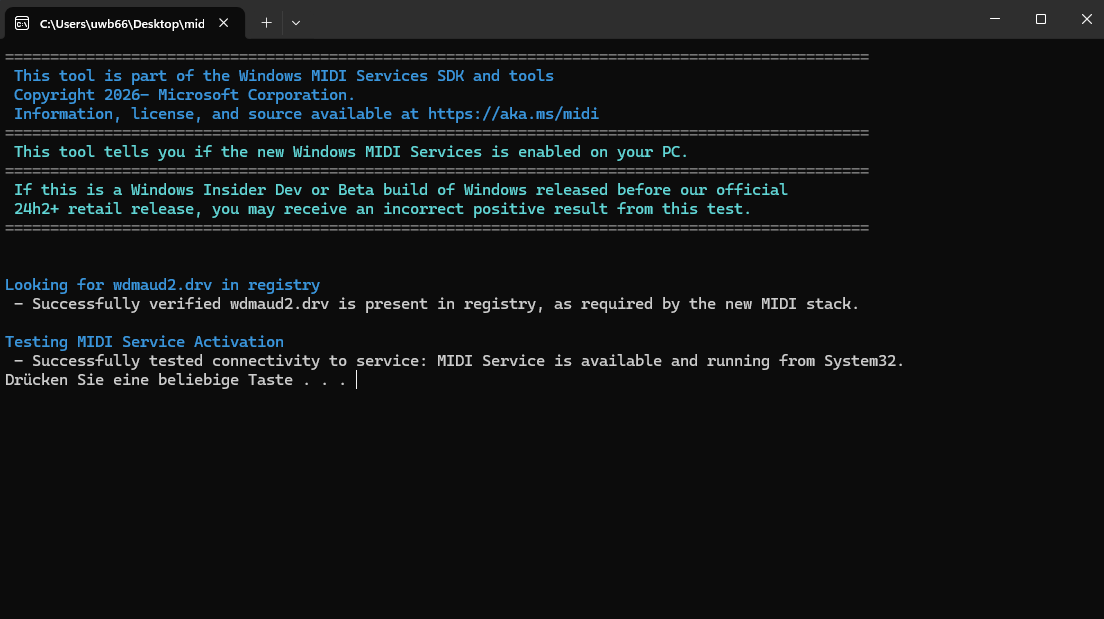
I uninstalled all the suggested KB updates, and now it also reports that they are no longer present when I do it via CMD.
Unfortunately, this didn't help.
The MIDI Check tool still reports that version 2 is installed.
Posted Wed 04 Mar 26 @ 9:19 am
 DJJamieFox
The Midi tool is telling you that the 'new' MIDI 2.0 is active. This is not good for certain controllers. Windows updates KB5074105, KB5077241, and KB5077181 will need to be uninstalled for certain controllers to work correctly again. Then you will have to pause updates until the fixed version of MIDI 2.0 comes out later this month.
I saw you said you had uninstalled the updates. Did you also pause your updates? If you don't, the updates WILL reinstall on their own automatically. You also may have to use the command prompt to force their uninstall.
As 'DJDAD' had already said... There are more issues with these updates with VDJ (and Serato) than just the MIDI 2.0 problem. MS likes to break stuff on us.
I saw you said you had uninstalled the updates. Did you also pause your updates? If you don't, the updates WILL reinstall on their own automatically. You also may have to use the command prompt to force their uninstall.
As 'DJDAD' had already said... There are more issues with these updates with VDJ (and Serato) than just the MIDI 2.0 problem. MS likes to break stuff on us.
Posted Thu 05 Mar 26 @ 10:22 am
UweB
I uninstalled these updates!
It didn't help!
That's what I wanted to say.
Now, when I try to uninstall these updates via CMD, I get the message:
"These updates are not installed on this computer!"
So there must be something else going on.
Also, not installing these updates can hardly be the solution.
VDJ needs to resolve this in the medium term.
It didn't help!
That's what I wanted to say.
Now, when I try to uninstall these updates via CMD, I get the message:
"These updates are not installed on this computer!"
So there must be something else going on.
Also, not installing these updates can hardly be the solution.
VDJ needs to resolve this in the medium term.
Posted Thu 05 Mar 26 @ 11:25 am
 Dan (djtouchdan)
It’s not a VDJ issue. A quick google search you will see that Serato users are also affected.
Will there be a fix, more than likely. But Microsoft introduced this issue.
Will there be a fix, more than likely. But Microsoft introduced this issue.
Posted Thu 05 Mar 26 @ 11:32 am
DJJamieFox
Dan (djtouchdan) wrote :
It’s not a VDJ issue. A quick google search you will see that Serato users are also affected.
Will there be a fix, more than likely. But Microsoft introduced this issue.
Will there be a fix, more than likely. But Microsoft introduced this issue.
Dan is absolutely correct. The MIDI 2.0 was introduced in KB5074105 specifically. If the MIDI tool says its still there then KB5074105 is still present on your system and will have to be uninstalled for certain controllers to work again. This is a Microsoft problem and not VDJ (or Serato, which has problems with it as well). The bigger problem is that KB5074105 is one that installs automatically and not as an option. I formatted 3 different laptops testing this and the outcome was always the same. You may have to force the uninstall of these on the command prompt (CMD) to get rid of them.
Also, the reason you would have uninstall KB5077181 and KB5077241 is because they came after KB5074105 and are cumulative updates.
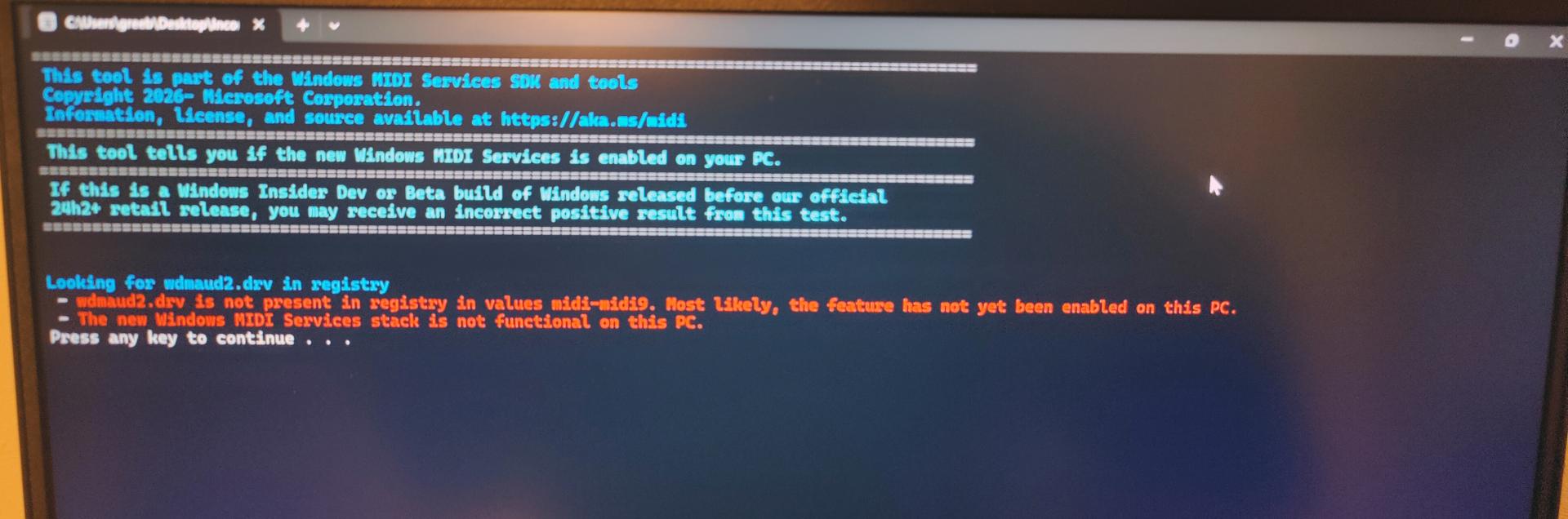
This what you should be seeing.
Posted Thu 05 Mar 26 @ 12:10 pm
UweB
Okay, it's possible we now have to pray that Microsoft fixes this.
I'm afraid that won't happen anytime soon.
On top of that, I CAN'T uninstall the update!
Because it's not there! In other words, the uninstalling workaround doesn't seem to work for some people.
So, all that remains is the strange behavior with the latest early version regarding the handling of tags.
I think it's based on the following pattern:
I have a file that is fully tagged.
I then change the genre tag from #House to #Hardstyle using mp3Tag or any other tool.
I then start reading the BPM and tags from this file so that the database.xml is updated.
VDJ doesn't see this and then writes the contents of the database into the tag!
I can reproduce this at any time, and unfortunately, it applies to all database.xml entries that are then stored in the file as tags.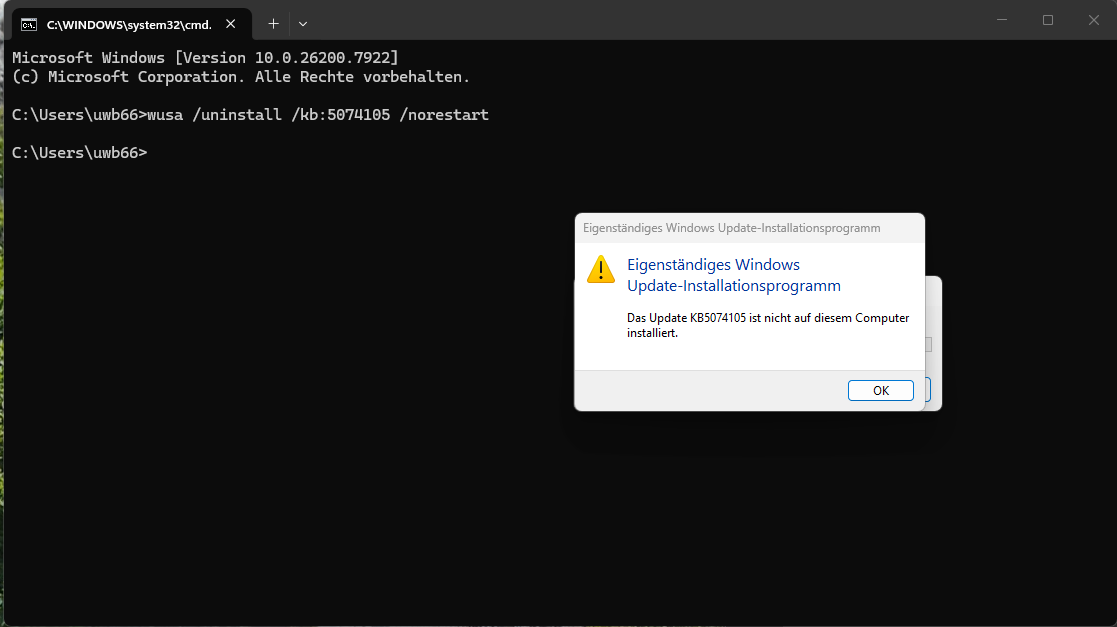
I'm afraid that won't happen anytime soon.
On top of that, I CAN'T uninstall the update!
Because it's not there! In other words, the uninstalling workaround doesn't seem to work for some people.
So, all that remains is the strange behavior with the latest early version regarding the handling of tags.
I think it's based on the following pattern:
I have a file that is fully tagged.
I then change the genre tag from #House to #Hardstyle using mp3Tag or any other tool.
I then start reading the BPM and tags from this file so that the database.xml is updated.
VDJ doesn't see this and then writes the contents of the database into the tag!
I can reproduce this at any time, and unfortunately, it applies to all database.xml entries that are then stored in the file as tags.
Posted Thu 05 Mar 26 @ 12:44 pm
 Adion
Adion
Quote :
I then start reading the BPM and tags from this file so that the database.xml is updated.
What do you mean by this?
Were the files already in the database/seen by vdj before?
Posted Thu 05 Mar 26 @ 1:15 pm
DJJamieFox
Check on the command prompt to see if the other two updates are uninstalled (KB5077181 and KB5077241).
Posted Thu 05 Mar 26 @ 2:24 pm
UweB
Quote :
What do you mean by this?
Were the files already in the database/seen by vdj before?
Were the files already in the database/seen by vdj before?
In the described scenario, where it's reproducible, yes.
If I change any tags in another tool, VDJ doesn't seem to see them and then writes everything it finds for the track back into the tags.
Posted Thu 05 Mar 26 @ 3:04 pm
Adion
Changes from other programs are not read automatically by vdj, and when setTagsAuto is set to yes, vdj will indeed write the tags based on the information currently in the database when any data changes.
So in that case you would need to make sure that you reload the tag in VDJ before any other changes occur.
So in that case you would need to make sure that you reload the tag in VDJ before any other changes occur.
Posted Thu 05 Mar 26 @ 3:13 pm
UweB
Quote :
Check on the command prompt to see if the other two updates are uninstalled (KB5077181 and KB5077241).
It's now failing after a few attempts. ( 0x800f0905 )
"wusa /uninstall /kb:5074105 /norestart"
I have no idea how to get rid of it anymore.
It was already uninstalled once and seems to have reinstalled itself with the last update.
So now I have no way of using VDJ Live with a controller.
I'm thrilled and will probably have to work with EngineOS for the time being...
Because I don't see Microsoft fixing this anytime soon.
b.t.w.
https://devblogs.microsoft.com/windows-music-dev/windows-midi-services-rollout-known-issues-and-workarounds/
Posted Thu 05 Mar 26 @ 3:13 pm
UweB
Quote :
Changes from other programs are not read automatically by vdj, and when setTagsAuto is set to yes, vdj will indeed write the tags based on the information currently in the database when any data changes.
So in that case you would need to make sure that you reload the tag in VDJ before any other changes occur.
So in that case you would need to make sure that you reload the tag in VDJ before any other changes occur.
That's what the function is for.
"Reread BPM and tags"
And it's NOT reading the tags that are in the file, actually!
VDJ is SUPPOSED to write the tags when I make changes IN VDJ.
Reading BPM and tags means reading from the file, not from the database.
I've been using it this way for years.
Posted Thu 05 Mar 26 @ 3:22 pm
DJJamieFox
UweB wrote :
It's now failing after a few attempts. ( 0x800f0905 )
"wusa /uninstall /kb:5074105 /norestart"
I have no idea how to get rid of it anymore.
It was already uninstalled once and seems to have reinstalled itself with the last update.
So now I have no way of using VDJ Live with a controller.
I'm thrilled and will probably have to work with EngineOS for the time being...
Because I don't see Microsoft fixing this anytime soon.
b.t.w.
https://devblogs.microsoft.com/windows-music-dev/windows-midi-services-rollout-known-issues-and-workarounds/
Quote :
Check on the command prompt to see if the other two updates are uninstalled (KB5077181 and KB5077241).
It's now failing after a few attempts. ( 0x800f0905 )
"wusa /uninstall /kb:5074105 /norestart"
I have no idea how to get rid of it anymore.
It was already uninstalled once and seems to have reinstalled itself with the last update.
So now I have no way of using VDJ Live with a controller.
I'm thrilled and will probably have to work with EngineOS for the time being...
Because I don't see Microsoft fixing this anytime soon.
b.t.w.
https://devblogs.microsoft.com/windows-music-dev/windows-midi-services-rollout-known-issues-and-workarounds/
I know this is beyond frustrating but have you ran these too?
wusa /uninstall /kb:5077181 /norestart
wusa /uninstall /kb:5077241 /norestart
All 3 of these updates have to be uninstalled and windows updates paused. They will try to install themselves again! I stopped and disabled the Windows Update Service to keep them out.
Posted Thu 05 Mar 26 @ 3:58 pm
 DJ VinylTouch
UweB wrote :
That's what the function is for.
"Reread BPM and tags"
And it's NOT reading the tags that are in the file, actually!
VDJ is SUPPOSED to write the tags when I make changes IN VDJ.
Reading BPM and tags means reading from the file, not from the database.
I've been using it this way for years.
"Reread BPM and tags"
And it's NOT reading the tags that are in the file, actually!
VDJ is SUPPOSED to write the tags when I make changes IN VDJ.
Reading BPM and tags means reading from the file, not from the database.
I've been using it this way for years.
I'm pretty sure this works on Mac once all the getTags and setTags related settings are enabled.
Posted Thu 05 Mar 26 @ 4:07 pm
UweB
It worked in the last early release and it still works in the current release candidate!
The bug was introduced with the last early release on Windows.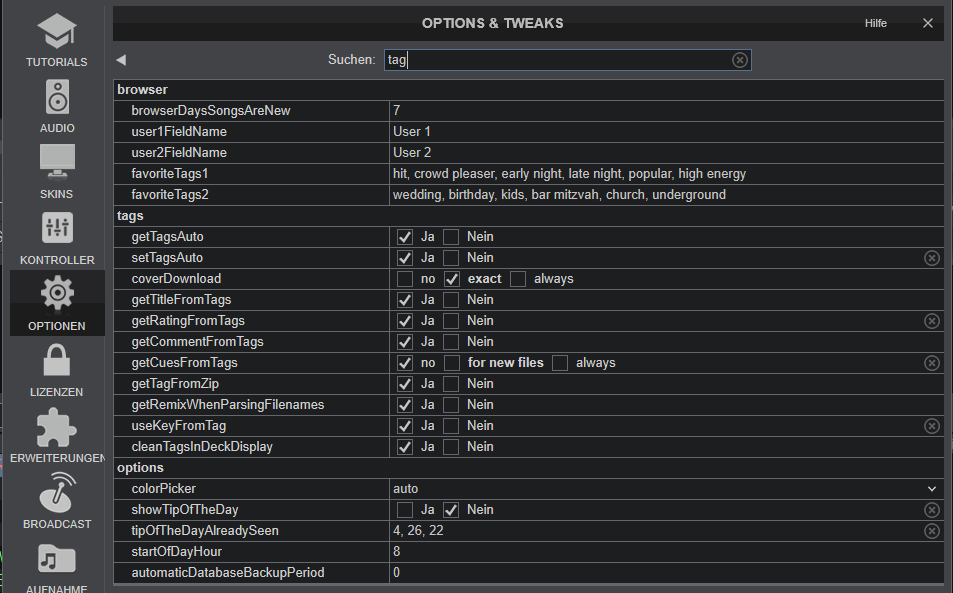
The bug was introduced with the last early release on Windows.
Posted Thu 05 Mar 26 @ 4:23 pm
UweB
Quote :
I know this is beyond frustrating but have you ran these too?
wusa /uninstall /kb:5077181 /norestart
wusa /uninstall /kb:5077241 /norestart
All 3 of these updates have to be uninstalled and windows updates paused. They will try to install themselves again! I stopped and disabled the Windows Update Service to keep them out.
wusa /uninstall /kb:5077181 /norestart
wusa /uninstall /kb:5077241 /norestart
All 3 of these updates have to be uninstalled and windows updates paused. They will try to install themselves again! I stopped and disabled the Windows Update Service to keep them out.
That's my problem.
All the updates are gone, except for the one I mentioned above, which I can't uninstall anymore.
Presumably because I forgot to block the update, and then something went wrong when I tried to uninstall it again.
Now I'm in a real mess and have to spend Saturday's gig with EngineOS. It's not that bad, but it definitely lacks some of the convenience features of VDJ.
I can deal with the database issue, but the fact that a reboot might be necessary...
If VDJ hiccups, no problem. I can even restart it while I'm rambling on to the audience.
But a full Windows reboot, including starting all the software...
... no... VDJ is out of the question for now.
Posted Thu 05 Mar 26 @ 10:33 pm
