



Stephane Clavel

Hello,
Just in time for the holiday season, please welcome our new VirtualDJ 2026.
True to our mission, VirtualDJ 2026 pushes again the boundaries of what it means to be a DJ in modern times, and is the first to introduce some new innovative features that are sure to become the DJing norm of the future.
Lyrics-assisted waveforms:
Thanks to the advances of AI, VirtualDJ will now automatically extract the lyrics from any audio track, and display them as part of the waveform.
This makes navigating the waveform easier than ever, and for DJs who like to push the boundaries of their art, it brings word-play mixing to another level !

AIPrompt folder:
VirtualDJ 2026 leverages the power of LLM and integrates your very own AI Assistant directly inside VirtualDJ. Ask him any question, and the AI will give you a nicely formatted list of tracks recommendations, with his explanation for each track, all ready to be dragged directly to a deck and played.

New professional FX engine:
VirtualDJ FX engine has been completely revamped and modernized, and now offers more than 122 effects, including almost every FX from popular hardware mixers like Pioneer or Rane.
As has always been VirtualDJ’s tradition, DJs now don’t have to choose, they can just have it all.

And much more:
Like a playful video plugin for lyrics visualization, a full-fledge automatic karaoke that works with any audio track, AI-based duplicates folder, and more...
Please note that the AIPrompt feature requires a PRO license, and the lyrics will get results only for popular songs unless you have a PRO license.
Just in time for the holiday season, please welcome our new VirtualDJ 2026.
True to our mission, VirtualDJ 2026 pushes again the boundaries of what it means to be a DJ in modern times, and is the first to introduce some new innovative features that are sure to become the DJing norm of the future.
Lyrics-assisted waveforms:
Thanks to the advances of AI, VirtualDJ will now automatically extract the lyrics from any audio track, and display them as part of the waveform.
This makes navigating the waveform easier than ever, and for DJs who like to push the boundaries of their art, it brings word-play mixing to another level !
AIPrompt folder:
VirtualDJ 2026 leverages the power of LLM and integrates your very own AI Assistant directly inside VirtualDJ. Ask him any question, and the AI will give you a nicely formatted list of tracks recommendations, with his explanation for each track, all ready to be dragged directly to a deck and played.
New professional FX engine:
VirtualDJ FX engine has been completely revamped and modernized, and now offers more than 122 effects, including almost every FX from popular hardware mixers like Pioneer or Rane.
As has always been VirtualDJ’s tradition, DJs now don’t have to choose, they can just have it all.
And much more:
Like a playful video plugin for lyrics visualization, a full-fledge automatic karaoke that works with any audio track, AI-based duplicates folder, and more...
Please note that the AIPrompt feature requires a PRO license, and the lyrics will get results only for popular songs unless you have a PRO license.
Posted Sun 07 Dec 25 @ 6:37 pm
Stephane Clavel
Just on the heels of VirtualDJ 2026, comes VirtualDJ 2026 Part 2, introducing even more cutting-edge technology that continues to define the future of DJing:
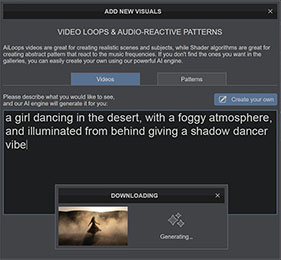
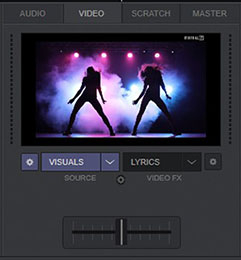
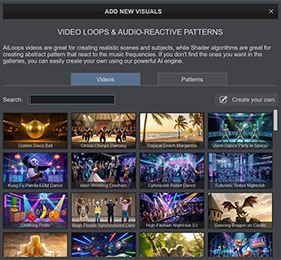
VISUALS: Use the power of AI to fill your video display with amazing content when you're playing audio-only tracks.
You can use traditional audio-reactive mesmerizing patterns (Shaders), that can now be generated by the AI engine from simple descriptive prompts.
Or ask the AI to generate high quality beat-synced realistic or animated video loops (AiLoops), with no limit to your creativity.
VARIABLE BEATGRID and BPM STABILIZER: A beta preview of our AI-powered variable BPM grid that handles any unsteady or variable BPM tracks, from old rock to disco to warped vinyl or megamixes.
But unlike some competitors, it has been made with pro DJs in mind. Professional DJs who want to mix without the SYNC button, can engage the BPM Stabilizer and lock any variable track to the current BPM and “steady” it during the transition, so it can be pitched and nudged manually and will stay in sync with the other deck.

LYRICS: The AI-powered lyrics detection algorithm has been significantly improved, allowing even better automatic transcription of lyrics from multiple languages, and open the door to creative word-play.

VirtualDJ 2026 Part 2 is available right now in Early Access:
PC: https://virtualdj.com/download/pc/earlyaccess
MAC: https://virtualdj.com/download/mac/earlyaccess
VISUALS: Use the power of AI to fill your video display with amazing content when you're playing audio-only tracks.
You can use traditional audio-reactive mesmerizing patterns (Shaders), that can now be generated by the AI engine from simple descriptive prompts.
Or ask the AI to generate high quality beat-synced realistic or animated video loops (AiLoops), with no limit to your creativity.
VARIABLE BEATGRID and BPM STABILIZER: A beta preview of our AI-powered variable BPM grid that handles any unsteady or variable BPM tracks, from old rock to disco to warped vinyl or megamixes.
But unlike some competitors, it has been made with pro DJs in mind. Professional DJs who want to mix without the SYNC button, can engage the BPM Stabilizer and lock any variable track to the current BPM and “steady” it during the transition, so it can be pitched and nudged manually and will stay in sync with the other deck.
LYRICS: The AI-powered lyrics detection algorithm has been significantly improved, allowing even better automatic transcription of lyrics from multiple languages, and open the door to creative word-play.
VirtualDJ 2026 Part 2 is available right now in Early Access:
PC: https://virtualdj.com/download/pc/earlyaccess
MAC: https://virtualdj.com/download/mac/earlyaccess
Posted 18 hours ago
Stephane Clavel
A quick note on the Variable BPM:
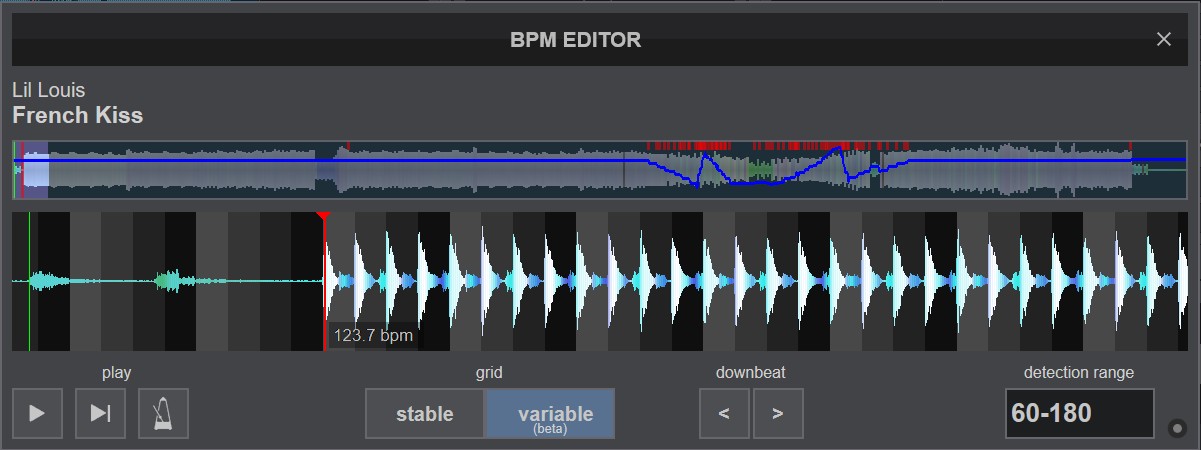
Because this is still an "Early Access", we didn't want to change the grids of all your tracks without warning. So in this build, Variable BPM still needs to be activated manually track by track.
So if you have any track that wasn't correctly mapped by the simple stable grid, just open the "BPM Editor" and select "Variable".
You can then either use sync or smart play, or engage the BPM Stabilizer (the small lock near the bpm display), and the track will beatmatch perfectly with the other deck.
Because this is still an "Early Access", we didn't want to change the grids of all your tracks without warning. So in this build, Variable BPM still needs to be activated manually track by track.
So if you have any track that wasn't correctly mapped by the simple stable grid, just open the "BPM Editor" and select "Variable".
You can then either use sync or smart play, or engage the BPM Stabilizer (the small lock near the bpm display), and the track will beatmatch perfectly with the other deck.
Posted 18 hours ago