


 Homeboy
Ok folks here is a simple fix without needing to power down or reboot your Mac computers.
First open config and go to the video tab. In the drop down menu window is currently shown but Mac doesn\\\\\\\\\\\\\\\'t recognize that its selected.
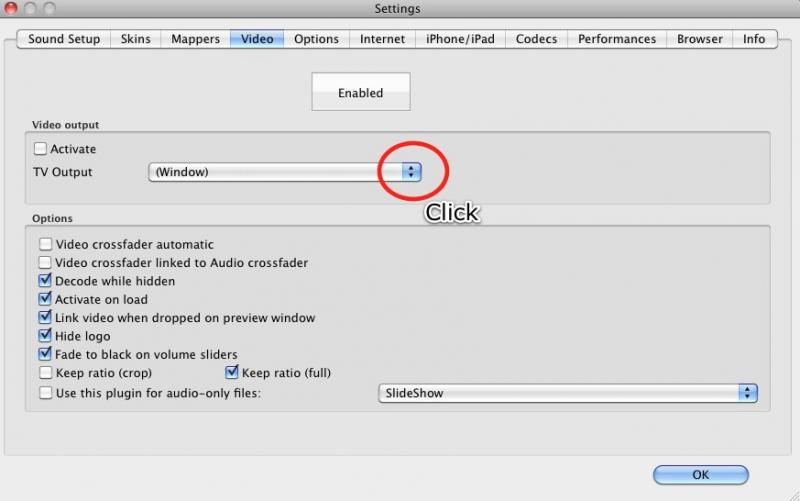
So Click the drop down menu
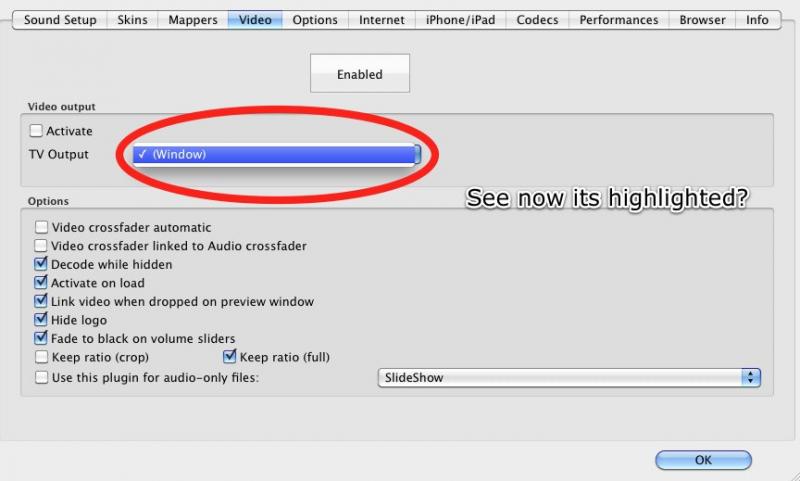
Now click directly on the word Window again.
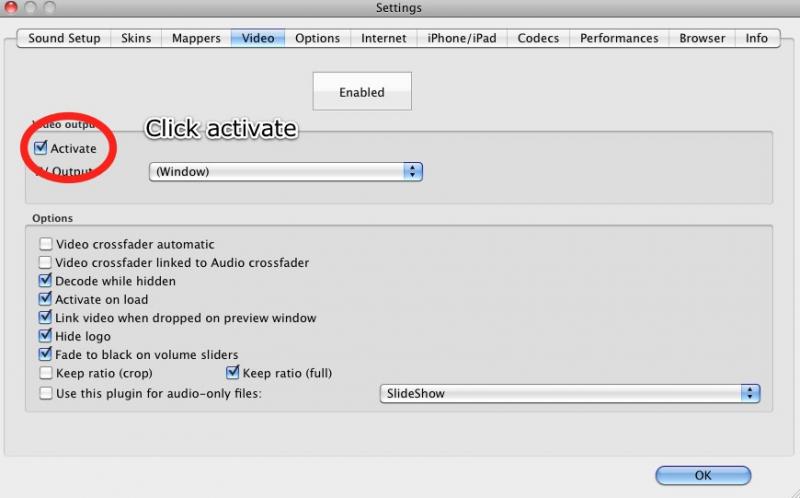
Now click activate. Then ok.
First open config and go to the video tab. In the drop down menu window is currently shown but Mac doesn\\\\\\\\\\\\\\\'t recognize that its selected.
So Click the drop down menu
Now click directly on the word Window again.
Now click activate. Then ok.
Posted Fri 19 Nov 10 @ 8:47 am
 Shinystar
Good job bro...That's a 5 star right here...
Posted Sun 05 Dec 10 @ 3:08 am
 AsTheDJ
This Error In Video Driver Pop Up For Me On Night @ The Club So I Just Rest It To The Factory Setting And Then I Was On Back On Line With The Video,But I Had To Reset All My Setting.But The Mac Was Not Much To Reset On The Setting Like My PC.
Posted Thu 13 Jan 11 @ 12:24 pm
 creati0n
WORD!!!
Posted Sun 20 Mar 11 @ 9:25 am
 cguild
Thanks! I'll have to give that a try. I've been running into this problem since i started video mixing and zipped karaoke.
Posted Thu 16 Jun 11 @ 3:57 am
AsTheDJ
DJ Homeboy wrote :
Ok folks here is a simple fix without needing to power down or reboot your Mac computers.
First open config and go to the video tab. In the drop down menu window is currently shown but Mac doesn\\\\\\\\\\\\\\\'t recognize that its selected.
So Click the drop down menu
Now click directly on the word Window again.
Now click activate. Then ok.
First open config and go to the video tab. In the drop down menu window is currently shown but Mac doesn\\\\\\\\\\\\\\\'t recognize that its selected.
So Click the drop down menu
Now click directly on the word Window again.
Now click activate. Then ok.
Make sure you remember to click back on the window tap before you log off of VDj, if you don't click the Window tab before you log off or have the same video input plug in from earlier log off,when you log back on VDj it will show ERROR in VIDEO driver when you play a video.No need to reset the settings on VDj
I hit the Window tab and disabled it if i'm not doing videos.
Posted Sun 19 Jun 11 @ 5:32 pm
 icefather
I wish that I had known this Friday night, but now I know. Thanks!
Posted Sun 26 Jun 11 @ 6:30 pm
DrrHaus
Thanks!!!!!!!!!!!
Posted Fri 08 Jul 11 @ 2:28 pm
cgarrow
Yes, thank you for the info and the fix!
Posted Sun 18 Sep 11 @ 11:54 am
sikko03
Thanx from Holland.
new macbook pro and in one time.. error in video drive
hope this wil never come again.
gr
new macbook pro and in one time.. error in video drive
hope this wil never come again.
gr
Posted Fri 11 Nov 11 @ 9:09 pm
 djpete218
still doesn't work 4 me
Posted Mon 09 Jan 12 @ 8:19 am
 djesco1
Thank you a Million Times Ten Million!!!!
I lost the capability of video play back after my Mac Pro Shut off from lack of power (battery drained all the way down and was not connected to an outlet) I was mixing music on a 12 hour flight. Once I landed I tried mixing video and it was not happening. I tried everything from a system clean up, going through settings (checking and un checking then re checking) rebooting before and after changes, re installing VDJ Pro (2 times) and THEN >>>>>> I read this post, followed the clear concise directions and WE NOW HAVE VIDEO!!! :)
Once again THANK YOU!!!
DJ Esco
I lost the capability of video play back after my Mac Pro Shut off from lack of power (battery drained all the way down and was not connected to an outlet) I was mixing music on a 12 hour flight. Once I landed I tried mixing video and it was not happening. I tried everything from a system clean up, going through settings (checking and un checking then re checking) rebooting before and after changes, re installing VDJ Pro (2 times) and THEN >>>>>> I read this post, followed the clear concise directions and WE NOW HAVE VIDEO!!! :)
Once again THANK YOU!!!
DJ Esco
Posted Mon 09 Jan 12 @ 2:13 pm
djlitttlebri
is there any way to config vdj pro so it recognizes my numark x5 mixer??
Posted Mon 06 Feb 12 @ 2:52 pm

Support staff

Numark X5 is not MIDI capable.
However, any standard external DJ mixer can be used with VirtualDJ providing that you have a suitable multi-channel sound card.
Please see our FAQ pages:
http://www.virtualdj.com/wiki/Will%20VirtualDJ%20work%20with%20my%20mixer.html
However, any standard external DJ mixer can be used with VirtualDJ providing that you have a suitable multi-channel sound card.
Please see our FAQ pages:
http://www.virtualdj.com/wiki/Will%20VirtualDJ%20work%20with%20my%20mixer.html
Posted Tue 07 Feb 12 @ 12:41 pm
 djmict
Thanks So much!
Posted Thu 16 Feb 12 @ 10:37 am
 Aziatikk Blakk
Why does 1080p video move slow on virtual Dj
Posted Wed 21 Mar 12 @ 9:43 am
valmore81
yeah why does 1080p video move slow on virtual Dj on Mac pro , same problem here.
Posted Sun 25 Mar 12 @ 7:18 pm
1djslim
Why is my computer screen showing when I want to video dj and not just the video
Posted Sat 02 Jun 12 @ 2:25 pm
Support staff
This is probably because your video settings are not configured correctly.
Please see our FAQ pages:
http://www.virtualdj.com/wiki/How%20do%20I%20output%20video%20or%20karaoke%20to%20a%20TV%20or%20projector.html
Please see our FAQ pages:
http://www.virtualdj.com/wiki/How%20do%20I%20output%20video%20or%20karaoke%20to%20a%20TV%20or%20projector.html
Posted Sat 02 Jun 12 @ 2:38 pm
 matteas_boi
valmore81 wrote :
yeah why does 1080p video move slow on virtual Dj on Mac pro , same problem here.
1080p video is very intense! i encode all my video to 720 and it plays just fine! im using a macbook pro 2.4Ghz i5 and 8GB ram and it only just handles 1080 but not comfortably!
remember also differant video codecs make a big difference! i found that div-x is not good! nether is mov... FLV seems to work well but only at 720 and below!...
the best video codec i've tried so far and its what im using myself is mpeg encoded as H.264 720p or under! with AAC audio!
Posted Thu 21 Jun 12 @ 9:09 pm
