


Blog
Behringer BCF2000 - Changing Emulation Modes
Fri 02 Feb 07 @ 9:35 pm
Common Description:
In addition to the standard B-CONTROL mode (bC) (for VDJ), since version 1.06 there are four so called ‘Emulation Modes’ for the BCF2000:
* Mackie Control; Mapping for Steinberg Cubase SX and Nuendo (MC C )
* Logic Control; Mapping for Emagic Logic Audio (LC)
* Mackie Control; Mapping for Cakewalk Sonar 3 (MCSo)
* Mackie Baby HUI; Mapping for various applications(bhul) e.g.
Digidesign Pro Tools, Steinberg Cubase SX/Nuendo (easier setting than Mackie Control Protocol)
Instructions:
-> Switch OFF the BCF2000 before starting
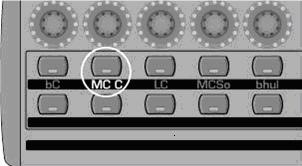
Example Mackie Control for Cubase -> MC C
-> Push & hold the desired mode button (see example above)
-> Switch ON the BCF2000 and wait until the selected mode is indicated
in the display
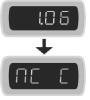
-> Release mode button
Remarks:
* After powering off/on next time, the mode last selected will be reactivated
* For changing modes, you have to switch off the BCF2000 and repeat the above procedure
* For each of the four emulation modes, making any control element or parameter changes on the B-CONTROL is not possible: neither preset changes nor GLOBAL EDIT selections!
The functionality of the pre-programmed control elements refers to the emulated hardware controller.
* The specifications of the parameters orient themselves on the original
Adaptations.
* Detailed descriptions of the original protocols and software adaptations of
the emulated hardware controllers can be found on the homepages of the
corresponding hardware manufacturers (controllers), software
manufacturers (adapted music application) or in the help menu of the
corresponding music software.
How to change GLOBAL MENU parameters before starting the selected
emulation mode:
Instructions:
-> Push & hold the desired mode button
Example Mackie Control for Cubase -> MC C
-> Switch ON the BCF2000 and wait until “EG” (EDIT GLOBAL MODE)
is indicated on the display
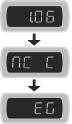
-> Edit the global settings with the push encoders 1 to 8 as the
operating mode and device ID
->After having completed your selections, press the EXIT button to
get into the preselected emulation mode
For further information please visit http://www.behringer.com/