


 Tron-is-Tron
My Rane Four seems to work good with Virtual except for mapping a volume for the sampler volume (Can't seem to map the controller volume knob with a skin knob) AND the onboard effects. Flanger, echo, etc. all seem to work fine, but I can't seem to map the paddles and effects. Is this not allowed on Virtual? Or is it that those certain effects just don't work on VDJ?
Posted Mon 09 Mar 26 @ 9:24 pm
 PhantomDeejay
Please read:
https://www.virtualdj.com/manuals/hardware/rane/four/layout/mixer.html#effects
Rane Four is capable of doing both Hardware and Software Effects.
https://www.virtualdj.com/manuals/hardware/rane/four/layout/mixer.html#effects
Rane Four is capable of doing both Hardware and Software Effects.
Posted Mon 09 Mar 26 @ 9:39 pm
Tron-is-Tron
Thank you. I know what each knob and paddle does on the Rane four effects, but I guess I was asking if there is a way to map them to a VDJ skin. I can't seem to get them to work on ANY skin no matter how much I try to map. However, I appreciate the quick response!
Posted Tue 10 Mar 26 @ 2:55 pm
 DJ VinylTouch
This is a controller with an external mixer setup, which means that the hardware controls the audio mixing portion, so it makes sense to disable the skin functionality - they won't do anything but show control changes if the control sends MIDI (you can see this is done in the ONINIT key for the controller).
The Paddles do send MIDI it seems (there are key entries for them), so you could modify mappings if you wanted.
If the control doesn't send MIDI, you won't see changes, but most likely it doesn't matter because skin itself isn't doing anything wrt the audio for the controller.
The only case that you wouldn't want that is if you are using a soundcard that is not the one onboard the controller.
All of your answers would reside in the
Controllers tab (where all the mappings are shown), and you can probably edit the skin to see what is being queried to update the skin control in question in the skin's xml. By default, since they can toggle on/off of software effects, given you selected a software effect to enable, it should show the relevant effect being enabled/disabled in the effects section of the skin in question. For hardware effects, I'm not sure what value there is to show a difference as nothing in software functionality is changing at that point, but you may stil be able to do something with it.
The Paddles do send MIDI it seems (there are key entries for them), so you could modify mappings if you wanted.
If the control doesn't send MIDI, you won't see changes, but most likely it doesn't matter because skin itself isn't doing anything wrt the audio for the controller.
The only case that you wouldn't want that is if you are using a soundcard that is not the one onboard the controller.
All of your answers would reside in the
Controllers tab (where all the mappings are shown), and you can probably edit the skin to see what is being queried to update the skin control in question in the skin's xml. By default, since they can toggle on/off of software effects, given you selected a software effect to enable, it should show the relevant effect being enabled/disabled in the effects section of the skin in question. For hardware effects, I'm not sure what value there is to show a difference as nothing in software functionality is changing at that point, but you may stil be able to do something with it.
Posted Tue 10 Mar 26 @ 3:31 pm
Tron-is-Tron
Thank you for your response. I can see that the controller DOES send MIDI, and I also see in the skin where the paddles can be mapped as well. I tried to map those (before I let my pro license expire) and they still didn't work. However, I did not think about disabling the skin functionality, nor did I see an "ONINIT key". Unless I saw it and didn't know what it was or what it was used for. I'll see what I can find out about editing the xml for the skin/skins I have chosen. Thanks again for the suggestions.
Posted Tue 10 Mar 26 @ 5:02 pm
PhantomDeejay
You should not really mess with the mapping of Rane Four as a begginer.
The scripts involved are NOT begginer friendly.
As I said, the controller can control software effects and everything is premapped to allow this.
This also means that you can see the selected software effects that the paddles will control when in software fx mode, on the skin.
You should just read the manual above and try the controls. You'll see that you don't need to modify anything.
The scripts involved are NOT begginer friendly.
As I said, the controller can control software effects and everything is premapped to allow this.
This also means that you can see the selected software effects that the paddles will control when in software fx mode, on the skin.
You should just read the manual above and try the controls. You'll see that you don't need to modify anything.
Posted Tue 10 Mar 26 @ 7:13 pm
 Tronis Tron
Thank you again for your response. I have tried the defualt settings / mappings only to have them NOT work. Which is why I asked if it is supported. I don't reallly want to fool around with mappings, but I think if the defaults don't work, I need to find a way to make them work. I mapped stems and other effects on an old controller (Numark) and was wondering if the Rane could be mapped too. But I agree, reading would be best IF I only had the time to read through all of it.
Posted Wed 11 Mar 26 @ 3:41 am
DJ VinylTouch
Maybe start off by saying what it is you expect the mapping of the paddles to do and why the default mapping doesn't work for you?
Posted Wed 11 Mar 26 @ 4:12 am
PhantomDeejay
Tronis Tron wrote :
But I agree, reading would be best IF I only had the time to read through all of it.
It's a 3 minute reading.
I bet that you spent more time trying to "fix" something that doesn't need to be fixed.
Better yet, read the entire manual. 10 minutes reading at most.
It will save you a ton of questions and a lot of time, as it explains how stems work, how you can apply effects on stems e.t.c.
On the other hand, if you just want to spent time trying to do your stuff, then be my guest I guess..
But the controller works fine and it's mapping does everything it's meant to do! :)
Posted Wed 11 Mar 26 @ 7:35 am
Tron-is-Tron
Thank you both for the great insights.
PHANTOMDEEJAY: I have read the 3 minute and most of the 10 minute docs but still can't get what I want to use mapped. Maybe I'll have to dig a little deeper and read a little slower. I know how STEMS work and effects on them etc. As I stated previously, I have mapped them before on an older Numark controller. I just can't seem to figure it out on the RANE. The controller itself DOES work fine. STEMS works fine on it too. But not all functions (effects) work on the VDJ skins.
DJ VINYLTOUCH: When using my Rane Four with Serato software, the Echo, Recycle, Scale Dn, Scale Up, Riser, Matrix, and Echo Out effects work perfect with the paddles, as they should. The sampler level volume also works perfectly. If you look at a pic of the controller you will see which ones I'm referring to. Again, this is for Serato software which I don't really like. When I use Virtual software, those same effects DO NOT work. And I cannot find a way to map those same effects (nor the sampler level volume) to work with VDJ. All channel effects work for both software's, but not the ones I mentioned. I have seen YouTube videos where they are mapped on VDJ but no one is sharing how lol.
PHANTOMDEEJAY: I have read the 3 minute and most of the 10 minute docs but still can't get what I want to use mapped. Maybe I'll have to dig a little deeper and read a little slower. I know how STEMS work and effects on them etc. As I stated previously, I have mapped them before on an older Numark controller. I just can't seem to figure it out on the RANE. The controller itself DOES work fine. STEMS works fine on it too. But not all functions (effects) work on the VDJ skins.
DJ VINYLTOUCH: When using my Rane Four with Serato software, the Echo, Recycle, Scale Dn, Scale Up, Riser, Matrix, and Echo Out effects work perfect with the paddles, as they should. The sampler level volume also works perfectly. If you look at a pic of the controller you will see which ones I'm referring to. Again, this is for Serato software which I don't really like. When I use Virtual software, those same effects DO NOT work. And I cannot find a way to map those same effects (nor the sampler level volume) to work with VDJ. All channel effects work for both software's, but not the ones I mentioned. I have seen YouTube videos where they are mapped on VDJ but no one is sharing how lol.
Posted Wed 11 Mar 26 @ 2:19 pm
DJ VinylTouch
I'm pretty sure those buttons only select software effects in VirtualDJ and the paddles trigger on and off.
I think a few people here on the forum own and use that controller and have never complained about the effects not working (I believe @PhantomDeejay may be an owner, and if not, he did the actual mapping).
Is your issue that the specific effects on the faceplate are not used? I don't own the controller, but once again those buttons only select software effects to enable with the paddle. The software itself has to have those effects installed to match the faceplate.
As for the sampler volume knob - it's an external mixer controller (and hence it would make sense that it's not MIDI mapped to anything because it is assigned a permanent, hardware based control) but I thought I saw there was a key mapping for that. Is it that the control isn't working or is it that you just don't see it doing anything on the skin? The former is an actual problem. The latter is not.
Also, remember that VirtualDJ's aim in the mapping isn't to equal Serato, it's to map it in a way that makes sense from the perspective of what is on the faceplate (where it makes sense), and from the perspective of VietualDJ functionality it would expose - that's why the VirtualDJ hardware manual is the first place to check (not Serato).
The term "made for Serato" is just marketing - the Serato sticker and advanced release is something that is negotiated. The functionality/protocol under the hood, that it is based on, works for anything that understands it. That is why mapping is possible, so it really is made for anything that understands its protocols (if you are a Linux user, you'd also understand this more in the world of "made for Windows" laptops).
I think a few people here on the forum own and use that controller and have never complained about the effects not working (I believe @PhantomDeejay may be an owner, and if not, he did the actual mapping).
Is your issue that the specific effects on the faceplate are not used? I don't own the controller, but once again those buttons only select software effects to enable with the paddle. The software itself has to have those effects installed to match the faceplate.
As for the sampler volume knob - it's an external mixer controller (and hence it would make sense that it's not MIDI mapped to anything because it is assigned a permanent, hardware based control) but I thought I saw there was a key mapping for that. Is it that the control isn't working or is it that you just don't see it doing anything on the skin? The former is an actual problem. The latter is not.
Also, remember that VirtualDJ's aim in the mapping isn't to equal Serato, it's to map it in a way that makes sense from the perspective of what is on the faceplate (where it makes sense), and from the perspective of VietualDJ functionality it would expose - that's why the VirtualDJ hardware manual is the first place to check (not Serato).
The term "made for Serato" is just marketing - the Serato sticker and advanced release is something that is negotiated. The functionality/protocol under the hood, that it is based on, works for anything that understands it. That is why mapping is possible, so it really is made for anything that understands its protocols (if you are a Linux user, you'd also understand this more in the world of "made for Windows" laptops).
Posted Wed 11 Mar 26 @ 2:44 pm
Tron-is-Tron
I understand that "Made for Serato" is only marketing. My old Numark says the same thing yet worked perfectly with Virtual. ("Is your issue that the specific effects on the faceplate are not used? I don't own the controller, but once again those buttons only select software effects to enable with the paddle. The software itself has to have those effects installed to match the faceplate"). Unless I am missing what the word "faceplate means, and if I understand correctly, you are asking if the effects are used, and if they work? If so, yes! They are used, and they do work. Just not on VDJ, or at least not on the skins I have tried. Also, by saying that the software itself has to have those effects installed to match the faceplate, does this mean that Virtual does not have those effects installed to map to the controller? The paddles triggering on and off makes sense. Thanks for that as I was thinking the other way around.
On one or two of the skins I have downloaded, there is a sampler knob on the skin. But I can't get it to map, or to work (Although it does work on other software).
I don't mean to make this any harder or complicated than what it is so I apologize for any misunderstandings. I've only had one or two Linux classes (Red Hat) so that may be a problem too lol. Thanks for the help.
On one or two of the skins I have downloaded, there is a sampler knob on the skin. But I can't get it to map, or to work (Although it does work on other software).
I don't mean to make this any harder or complicated than what it is so I apologize for any misunderstandings. I've only had one or two Linux classes (Red Hat) so that may be a problem too lol. Thanks for the help.
Posted Wed 11 Mar 26 @ 4:32 pm
DJ VinylTouch
Tron-is-Tron wrote :
Unless I am missing what the word "faceplate means, and if I understand correctly, you are asking if the effects are used, and if they work? If so, yes! They are used, and they do work. Just not on VDJ, or at least not on the skins I have tried. Also, by saying that the software itself has to have those effects installed to match the faceplate, does this mean that Virtual does not have those effects installed to map to the controller?
In order to trigger thw effect, in software, the software must have an implementation of the effect (that's pretty self explanatory). The software can also choose to put other effects in place of what is triggered by the button (i.e. the faceplate is only a marking, it doesn't mean the software has to provide that). Other hardware, such as DJM-S mixers, use FX instead of an actual name on the faceplate/button for this very reason. The hardware on the other hand, most likely has those effects built in and enabled by default at those positions (hence the markings).
Tron-is-Tron wrote :
On one or two of the skins I have downloaded, there is a sampler knob on the skin. But I can't get it to map, or to work (Although it does work on other software).
I don't mean to make this any harder or complicated than what it is so I apologize for any misunderstandings. I've only had one or two Linux classes (Red Hat) so that may be a problem too lol. Thanks for the help.
On one or two of the skins I have downloaded, there is a sampler knob on the skin. But I can't get it to map, or to work (Although it does work on other software).
I don't mean to make this any harder or complicated than what it is so I apologize for any misunderstandings. I've only had one or two Linux classes (Red Hat) so that may be a problem too lol. Thanks for the help.
I'm pretty sure it works with mappings. The issue most likely is your controller doesn't send MIDI for the sample knob or something to that effect because it's an external mixer based controller (audio mixing + volume is done on the controller itself) (you can ask the devs about that). Did you try raising the physical volume knob to the max and then adjusting it? Sometimes that's needed for the skin display/audio to "catch" itself - I've seen (and still see) this with my DJM-S11 and assume it may have something to do with the controller not reporting the initial position of the sampler knob on connection establishment properly (also, just check the ONINIT key to see if there isn't any explicit setting of the sampler volume to max/100%, then it's definitely suggested to try to move the knob to the max first).
However, given it is actually doing the right thing (lowering or raising sampler volume), and you can look at the physical knob position to know where the volume is, it shouldn't be that much of an issue.
Posted Wed 11 Mar 26 @ 5:10 pm
Tron-is-Tron
Making a little more sense when you explain about the software choosing to put other effects in place of what is triggered by the button. Although I have seen YouTube videos where ALL of the desired effects work on VDJ with the RANE Four, I'm now wondering if those are old videos, or maybe older skins.
As for the sampler volume knob, when I try to map, I see the controller does midi to the skin, I saw numbers 0 through 9 appear and move when I turn the physical knob on the controller. I just don't know how to map it or lock it in. You mentioned the ONINIT key previously so I will check more into what exactly it does, where to find it, and how it works. Again, I really appreciate your responses to all of this. The same for PHANTOMDEEJAY.
As for the sampler volume knob, when I try to map, I see the controller does midi to the skin, I saw numbers 0 through 9 appear and move when I turn the physical knob on the controller. I just don't know how to map it or lock it in. You mentioned the ONINIT key previously so I will check more into what exactly it does, where to find it, and how it works. Again, I really appreciate your responses to all of this. The same for PHANTOMDEEJAY.
Posted Wed 11 Mar 26 @ 6:54 pm
PhantomDeejay
I still can't understand what's not working for you.
Please stop going around the table, and describe with clear steps 1,2,3 what you're doing, what you expect to happen, and what's happening.
The only limitation the device really has, when it comes to software effects, is that for the most part they have to be triggered by the controller itself, and not the GUI, because the device has effect send/return channels.
Also, in order to be sure that software effects are working as they should, you should use the controller to select them and adjust their parameters. That's because the controller can control up to six effect slots that have to be common among all decks.
The factory default mapping ensures that when you select an effect on a given slot (let's say slot 4) by using the controller, it gets copied on all 4 decks so that they all can trigger it.
These "quirks" are because of the way the device is designed to work.
However they should not be any kind of limitation to user experience.
Now, again, the unit has it's own hardware effects (the HX/SW FX button is blue)
Effects like Echo Out, Rider, STTR Out and others. Those effects are hardware and work exactly the same regardless the software you're using.
Also both Serato and VirtualDJ pass the BPM of the deck on the unit so that it has precise timing for beat aware effects.
Then, there are software effects (the HW/SW FX button is orange)
In this mode the six effect buttons "ARM" one of the first 6 effect slots in VirtualDJ GUI.
And then the paddles turn on/off the effects of these slots.
When in software mode, the first FX button, "arms" the first FX Slot on VirtualDJ GUI.
The second FX button arms the second FX slot, e.t.c.
Same as with hardware effects, the FX buttons on the "right" deck are not there to arm slots for the right deck. They are there to arm effect slots 4, 5 and 6.
By default Effect slots 4, 5 and 6 are not visible on VirtualDJ GUI but you can click on the effects panel to make the 6 slots view visible on the PRO layout.
So, let's say that you want to use SOFTWARE ECHO effect which is loaded on FX slot 1 on all decks to apply an echo on deck 2.
What you do is this:
1. Make sure the HW/SW FX button is orange.
2. Press the first of the 6 effect buttons (that's located on top left of the left deck area) so that it turns on.
3. Make sure the FX Assign buttons are showing the correct decks set (1 VS 3 and 2 VS 4) Here you want CH2 to be on.
4. Use the right FX paddle
Now if you want to use the hardware effects (like Riser) the procedure is exactly the same.
Only that HW/SW FX button has to be blue. And you need to press the 4th effect button (1st fx button on the right deck side) assuming that you have not modified the factory default fx memories of the unit.
So..
Please try to explain what you're trying to do..
Please stop going around the table, and describe with clear steps 1,2,3 what you're doing, what you expect to happen, and what's happening.
The only limitation the device really has, when it comes to software effects, is that for the most part they have to be triggered by the controller itself, and not the GUI, because the device has effect send/return channels.
Also, in order to be sure that software effects are working as they should, you should use the controller to select them and adjust their parameters. That's because the controller can control up to six effect slots that have to be common among all decks.
The factory default mapping ensures that when you select an effect on a given slot (let's say slot 4) by using the controller, it gets copied on all 4 decks so that they all can trigger it.
These "quirks" are because of the way the device is designed to work.
However they should not be any kind of limitation to user experience.
Now, again, the unit has it's own hardware effects (the HX/SW FX button is blue)
Effects like Echo Out, Rider, STTR Out and others. Those effects are hardware and work exactly the same regardless the software you're using.
Also both Serato and VirtualDJ pass the BPM of the deck on the unit so that it has precise timing for beat aware effects.
Then, there are software effects (the HW/SW FX button is orange)
In this mode the six effect buttons "ARM" one of the first 6 effect slots in VirtualDJ GUI.
And then the paddles turn on/off the effects of these slots.
When in software mode, the first FX button, "arms" the first FX Slot on VirtualDJ GUI.
The second FX button arms the second FX slot, e.t.c.
Same as with hardware effects, the FX buttons on the "right" deck are not there to arm slots for the right deck. They are there to arm effect slots 4, 5 and 6.
By default Effect slots 4, 5 and 6 are not visible on VirtualDJ GUI but you can click on the effects panel to make the 6 slots view visible on the PRO layout.
So, let's say that you want to use SOFTWARE ECHO effect which is loaded on FX slot 1 on all decks to apply an echo on deck 2.
What you do is this:
1. Make sure the HW/SW FX button is orange.
2. Press the first of the 6 effect buttons (that's located on top left of the left deck area) so that it turns on.
3. Make sure the FX Assign buttons are showing the correct decks set (1 VS 3 and 2 VS 4) Here you want CH2 to be on.
4. Use the right FX paddle
Now if you want to use the hardware effects (like Riser) the procedure is exactly the same.
Only that HW/SW FX button has to be blue. And you need to press the 4th effect button (1st fx button on the right deck side) assuming that you have not modified the factory default fx memories of the unit.
So..
Please try to explain what you're trying to do..
Posted Wed 11 Mar 26 @ 11:25 pm
Tronis Tron
I think you hit the nail on head with your explanation! I forgot about the blue-orange HW/SW FX button. I have left it on hardware (blue) and tried to map it using the eyedropper and couldn't figure it out. So for now, everything is back to default original settings. What you have described is exactly what I am trying to do. I was trying to get the HW EFX to work with VDJ. My question then, is there a certain skin that needs to be used? You are saying I should have the button on SF efx (Orange) in order to work but it also sounds like you are saying the HW should work too. In ither case, I will try again using the steps you gave with the button on orange.
I was able to map the sampler volume on the current skin I have but will use another if needed. Thank you! for your explanation.
I was able to map the sampler volume on the current skin I have but will use another if needed. Thank you! for your explanation.
Posted Thu 12 Mar 26 @ 1:36 am
PhantomDeejay
I still don't understand why you are so confused and all over the place.
If the button is blue, then hardware effects are applied. Period.
The hardware effects are not visible on VirtualDJ GUI. They don't have too. The controller doesn't care. If fact they are applied even if a DJ software and/or a computer is not connected.
The hardware effects are visible on the central screen of Rane Four. You have 6 slots and you can leave them at their default effects, or change them and select a different one from those that the unit offers.
This selection of hardware effects cannot be done via software. This selection is done from the controller itself. I'm not in front of the controller right now but IIRC it's similar to how it's done in software mode.
You hold down the effect slot button you wish to change, and then you turn the FX SELECT knob. Once you find a new effect that you like, press the FX SELECT knob down to select it.
All the information I provided here is more or less present on the manual page I gave you at the beggining.
In fact:
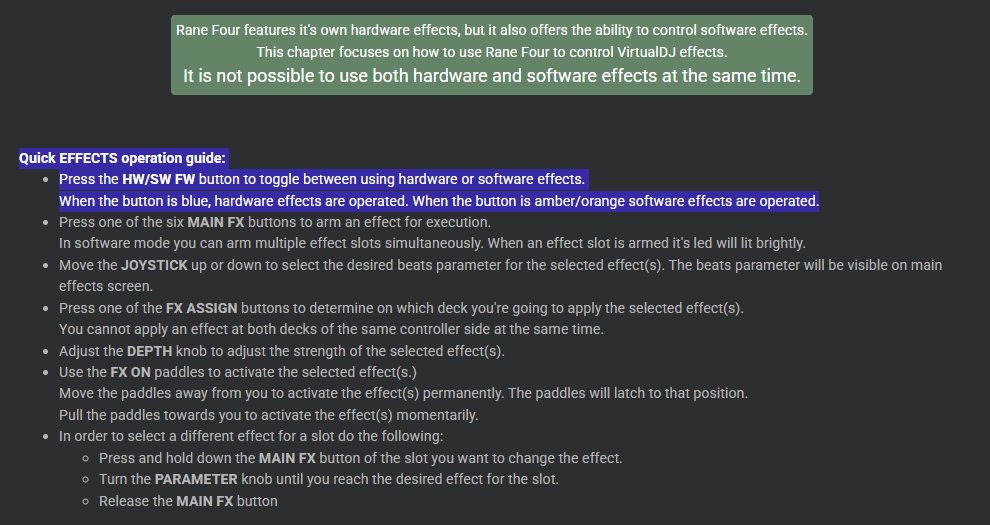
I highlighted the first bullet because it tells you exactly that: How to toggle between hardware and software effects, and that the color of the led shows you the mode you're operating.
PS: The procedure to activate hardware effects is EXACTLY the same with the software effects.
You press one of the 6 effect slot buttons to select an effect and then you use the paddles. Just in case that's what you're asking ?
If the button is blue, then hardware effects are applied. Period.
The hardware effects are not visible on VirtualDJ GUI. They don't have too. The controller doesn't care. If fact they are applied even if a DJ software and/or a computer is not connected.
The hardware effects are visible on the central screen of Rane Four. You have 6 slots and you can leave them at their default effects, or change them and select a different one from those that the unit offers.
This selection of hardware effects cannot be done via software. This selection is done from the controller itself. I'm not in front of the controller right now but IIRC it's similar to how it's done in software mode.
You hold down the effect slot button you wish to change, and then you turn the FX SELECT knob. Once you find a new effect that you like, press the FX SELECT knob down to select it.
All the information I provided here is more or less present on the manual page I gave you at the beggining.
In fact:
I highlighted the first bullet because it tells you exactly that: How to toggle between hardware and software effects, and that the color of the led shows you the mode you're operating.
PS: The procedure to activate hardware effects is EXACTLY the same with the software effects.
You press one of the 6 effect slot buttons to select an effect and then you use the paddles. Just in case that's what you're asking ?
Posted Thu 12 Mar 26 @ 7:53 am
Tron-is-Tron
PHANTOMDEEJAY: I understand perfectly what you are telling me about the controller and the slots (blue buttons), orange-blue hw/sw/fx button and etc. although I did forget about that. I understand that the effects can be changed with parameter changes on the controller using the toggle lever and the FX knob. I also understand that those will not be seen (not visible) on the GUI and only on the RANE central screen. Maybe it is you that doesn't understand what I was saying. They DID NOT WORK on ANY virtual skin I tried. Or with VDJ....period. I can't tell you why they DID NOT work, I just know they didn't. No matter what I tried. Therefore, I thought it was a mapping issue and I asked about mapping and if it was supported at all. But as of last night, I re-purchased a pro license, downloaded the newest version of VDJ, and I am now on the way to where I want to be concerning the effects. I have all of the slots working on VDJ (with paddles), along with stems and my sampler volume working as well. I was only asking about certain skins to see if one was better than the other to use with the RANE. Thanks again, your insights have been very helpful.
Posted Thu 12 Mar 26 @ 2:09 pm
DJ VinylTouch
You're talking to a dev of the software who most likely did the mapping for the controller in question, so I'm pretty sure he knows what he's talking about.
You keep focusing on the skin showing functionality of what the control is doing. That's actually not required - skins don't produce the audio or do the mixing. If the skin shows the control manipulation, that's a bonus but not a requirement.
I'm almost certain that the effect selection and pad toggle levers shows the enabling/disabling of the desired effect on the skin.
I'm also sure that the sampler volume on the skin can follow a sampler volume knob, because it happens for my DJM-S11 and DDJ-1000. If it doesn't happen for the Rane Four it's either the knob doesn't send MIDI (which I doubt since I saw an entry for it and you said you see activity for it) or you changed the mapping to cause it to not show differences.
At this point, you need to explain exactly what it is you are trying to do/see when the action is done, and @PhantomDeejay and others on the forum will help guide you on how to do it (if it makes sense).
You keep focusing on the skin showing functionality of what the control is doing. That's actually not required - skins don't produce the audio or do the mixing. If the skin shows the control manipulation, that's a bonus but not a requirement.
I'm almost certain that the effect selection and pad toggle levers shows the enabling/disabling of the desired effect on the skin.
I'm also sure that the sampler volume on the skin can follow a sampler volume knob, because it happens for my DJM-S11 and DDJ-1000. If it doesn't happen for the Rane Four it's either the knob doesn't send MIDI (which I doubt since I saw an entry for it and you said you see activity for it) or you changed the mapping to cause it to not show differences.
At this point, you need to explain exactly what it is you are trying to do/see when the action is done, and @PhantomDeejay and others on the forum will help guide you on how to do it (if it makes sense).
Posted Thu 12 Mar 26 @ 2:20 pm
Tron-is-Tron
My apologies if my last message was taken in the wrong way. I never said PHANTOMDEEJAY didn't know what he was talking about as his messages to me are very technical. What I said is (quote), "Maybe it is you that doesn't understand what I was saying". Meaning he didn't understand what I was trying to do, or maybe I was not saying what I wanted in the correct way. I do not know the technical verbiage of the software and that may be why I seem confused.
Here are the 1,2,3's of what I was trying to do, what I thought, and what is updated.
1) I wanted all of my effects and sampler volume knob to work with VDJ. I was asking if there was a mapping for that to happen as none of them worked with VDJ. I don't know why but they just DID NOT work. I forgot about the hw/sf/fx button on the controller that was mentioned as well. The update is they are all working now. slots 1 -6 (effects) are working but I need to tweek them for both sides. I will go back and re-read what was sent to me concerning this.
2) I was asking if there was a certain skin (maybe one built specifically for the RANE FOUR) to use with the controller. I wanted to see functioning buttons and knobs because I thought that was how the effects were controlled, through the skin. I see now that the skin doesn't matter when it comes to function. They are only a GUI and some will show different buttons and/or pads. The update is that I found one I feel suites my needs.
3) I wanted my sampler level volume to work with VDJ. It was not working at the time and I was asking for mapping for that as well. Although you say showing functionality is not required, as with the effects buttons, it felt good to see it/them move at the same time I move the controller knobs. I re-read the documentation sent to me by PHANTOMDEEJAY. Since then, I found a skin with a controller knob and mapped it using the eye dropper. The update is that it is now working the way I want it to work. It shows moving when I move the controller knob.
As i have stated in my last message, I have everything pretty much working along with the paddles too. Again, I don't mean to make this any harder or complicated than what it is so I apologize for any misunderstandings.
Here are the 1,2,3's of what I was trying to do, what I thought, and what is updated.
1) I wanted all of my effects and sampler volume knob to work with VDJ. I was asking if there was a mapping for that to happen as none of them worked with VDJ. I don't know why but they just DID NOT work. I forgot about the hw/sf/fx button on the controller that was mentioned as well. The update is they are all working now. slots 1 -6 (effects) are working but I need to tweek them for both sides. I will go back and re-read what was sent to me concerning this.
2) I was asking if there was a certain skin (maybe one built specifically for the RANE FOUR) to use with the controller. I wanted to see functioning buttons and knobs because I thought that was how the effects were controlled, through the skin. I see now that the skin doesn't matter when it comes to function. They are only a GUI and some will show different buttons and/or pads. The update is that I found one I feel suites my needs.
3) I wanted my sampler level volume to work with VDJ. It was not working at the time and I was asking for mapping for that as well. Although you say showing functionality is not required, as with the effects buttons, it felt good to see it/them move at the same time I move the controller knobs. I re-read the documentation sent to me by PHANTOMDEEJAY. Since then, I found a skin with a controller knob and mapped it using the eye dropper. The update is that it is now working the way I want it to work. It shows moving when I move the controller knob.
As i have stated in my last message, I have everything pretty much working along with the paddles too. Again, I don't mean to make this any harder or complicated than what it is so I apologize for any misunderstandings.
Posted Thu 12 Mar 26 @ 5:22 pm