


Been looking at the User Manual here:
https://virtualdj.com/manuals/virtualdj/interface/database/aiprompt.html
It says to right click on the "AI Prompt" folder, and a window should show, allowing me to select whether to use "Ask VirtualDJ" for the AI, or to use "Ask Google".
When I right click on the "AI Prompt" folder, I do not get the options shown - I only get "Hide" and "Properties"
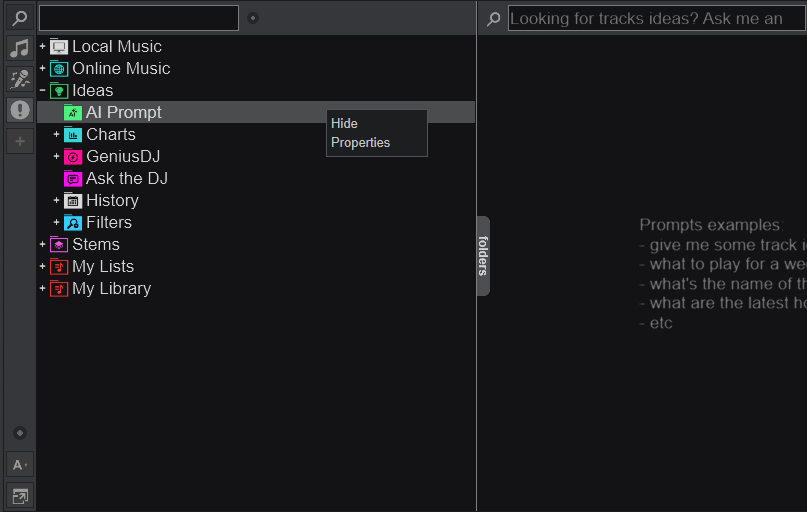
EDIT: Logged in with my VDJ PRO subscription, and running the latest VirtualDJ version (v2026 b9005) if that helps?
https://virtualdj.com/manuals/virtualdj/interface/database/aiprompt.html
It says to right click on the "AI Prompt" folder, and a window should show, allowing me to select whether to use "Ask VirtualDJ" for the AI, or to use "Ask Google".
When I right click on the "AI Prompt" folder, I do not get the options shown - I only get "Hide" and "Properties"
EDIT: Logged in with my VDJ PRO subscription, and running the latest VirtualDJ version (v2026 b9005) if that helps?
Posted Fri 20 Feb 26 @ 6:11 pm
 Dj-Mpex
I can confirm the same issue on macOS with the latest EA build.
- PRO Infinity (logged in)
- VirtualDJ 2026 EA b9171 (2026-02-17)
- Default skin tested (so not a skin issue)
Right-click on “AI Prompt” only shows “Hide” and “Properties” – no “Ask VirtualDJ / Ask Google (Gemini)” selector, and the green AI engine button next to the search field also does nothing / shows no dropdown.
AI Prompt itself still works (long “Thinking…” then results), but it looks like it’s using VirtualDJ’s AI only. Previously I had it set to Google/Gemini with a Google API key configured and it worked.
Also: natural-language prompts in the main search field that used to work with Google/Gemini now just returns the “AI search examples” instead of real results.
Seems like the Google/Gemini provider / UI selection is disabled or regressed in recent 2026 builds. Any ETA or workaround?
- PRO Infinity (logged in)
- VirtualDJ 2026 EA b9171 (2026-02-17)
- Default skin tested (so not a skin issue)
Right-click on “AI Prompt” only shows “Hide” and “Properties” – no “Ask VirtualDJ / Ask Google (Gemini)” selector, and the green AI engine button next to the search field also does nothing / shows no dropdown.
AI Prompt itself still works (long “Thinking…” then results), but it looks like it’s using VirtualDJ’s AI only. Previously I had it set to Google/Gemini with a Google API key configured and it worked.
Also: natural-language prompts in the main search field that used to work with Google/Gemini now just returns the “AI search examples” instead of real results.
Seems like the Google/Gemini provider / UI selection is disabled or regressed in recent 2026 builds. Any ETA or workaround?
Posted Sun 01 Mar 26 @ 12:04 pm
 DJ Dash El Mas Guapo
Dj-Mpex wrote :
I can confirm the same issue on macOS with the latest EA build.
- PRO Infinity (logged in)
- VirtualDJ 2026 EA b9171 (2026-02-17)
- Default skin tested (so not a skin issue)
Right-click on “AI Prompt” only shows “Hide” and “Properties” – no “Ask VirtualDJ / Ask Google (Gemini)” selector, and the green AI engine button next to the search field also does nothing / shows no dropdown.
AI Prompt itself still works (long “Thinking…” then results), but it looks like it’s using VirtualDJ’s AI only. Previously I had it set to Google/Gemini with a Google API key configured and it worked.
Also: natural-language prompts in the main search field that used to work with Google/Gemini now just returns the “AI search examples” instead of real results.
Seems like the Google/Gemini provider / UI selection is disabled or regressed in recent 2026 builds. Any ETA or workaround?
- PRO Infinity (logged in)
- VirtualDJ 2026 EA b9171 (2026-02-17)
- Default skin tested (so not a skin issue)
Right-click on “AI Prompt” only shows “Hide” and “Properties” – no “Ask VirtualDJ / Ask Google (Gemini)” selector, and the green AI engine button next to the search field also does nothing / shows no dropdown.
AI Prompt itself still works (long “Thinking…” then results), but it looks like it’s using VirtualDJ’s AI only. Previously I had it set to Google/Gemini with a Google API key configured and it worked.
Also: natural-language prompts in the main search field that used to work with Google/Gemini now just returns the “AI search examples” instead of real results.
Seems like the Google/Gemini provider / UI selection is disabled or regressed in recent 2026 builds. Any ETA or workaround?
Wow i had no idea using gemini was even an integrated option. Vdj never ceases to amaze. Hope they patch this bug soon
Posted Sun 01 Mar 26 @ 12:21 pm
 musicbycsharp
DJ Dash El Mas Guapo wrote :
Wow i had no idea using gemini was even an integrated option. Vdj never ceases to amaze. Hope they patch this bug soon
Dj-Mpex wrote :
I can confirm the same issue on macOS with the latest EA build.
- PRO Infinity (logged in)
- VirtualDJ 2026 EA b9171 (2026-02-17)
- Default skin tested (so not a skin issue)
Right-click on “AI Prompt” only shows “Hide” and “Properties” – no “Ask VirtualDJ / Ask Google (Gemini)” selector, and the green AI engine button next to the search field also does nothing / shows no dropdown.
AI Prompt itself still works (long “Thinking…” then results), but it looks like it’s using VirtualDJ’s AI only. Previously I had it set to Google/Gemini with a Google API key configured and it worked.
Also: natural-language prompts in the main search field that used to work with Google/Gemini now just returns the “AI search examples” instead of real results.
Seems like the Google/Gemini provider / UI selection is disabled or regressed in recent 2026 builds. Any ETA or workaround?
- PRO Infinity (logged in)
- VirtualDJ 2026 EA b9171 (2026-02-17)
- Default skin tested (so not a skin issue)
Right-click on “AI Prompt” only shows “Hide” and “Properties” – no “Ask VirtualDJ / Ask Google (Gemini)” selector, and the green AI engine button next to the search field also does nothing / shows no dropdown.
AI Prompt itself still works (long “Thinking…” then results), but it looks like it’s using VirtualDJ’s AI only. Previously I had it set to Google/Gemini with a Google API key configured and it worked.
Also: natural-language prompts in the main search field that used to work with Google/Gemini now just returns the “AI search examples” instead of real results.
Seems like the Google/Gemini provider / UI selection is disabled or regressed in recent 2026 builds. Any ETA or workaround?
Wow i had no idea using gemini was even an integrated option. Vdj never ceases to amaze. Hope they patch this bug soon
Same here on Windows. And i remember setting up the gemini key also. I wonder what happened?
Posted Sun 01 Mar 26 @ 3:09 pm
Hello together, I have the same issue and also would like to try Gemini.
Posted Tue 17 Mar 26 @ 3:34 pm
 Paul McKenzie
Add me to this list for Windows.
I wasn't aware google was an option, but right clicking on AI Prompt does not work as the manual states.
I wasn't aware google was an option, but right clicking on AI Prompt does not work as the manual states.
Posted Wed 18 Mar 26 @ 10:47 pm