


 kradcliffe
I sometimes overwrite a video file with a better quality version and replace the existing file.
Previously if I reanalyzed the file the waveform, CBG etc would be redrawn, however on b9171 this isn't happening.
The actual music starts where I have set the cue point so I'm assuming the wave of the previous file isn't being replaced or redrawn after being analyzed.
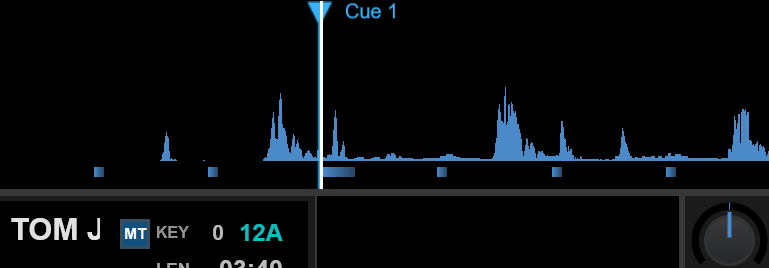
Previously if I reanalyzed the file the waveform, CBG etc would be redrawn, however on b9171 this isn't happening.
The actual music starts where I have set the cue point so I'm assuming the wave of the previous file isn't being replaced or redrawn after being analyzed.
Posted Thu 19 Feb 26 @ 9:45 pm
 PhantomDeejay
Are you sure ?
Waveforms (beside the ones shown on browser) are not stored anywhere and they are generated when you load the file on deck.
Waveforms (beside the ones shown on browser) are not stored anywhere and they are generated when you load the file on deck.
Posted Thu 19 Feb 26 @ 10:50 pm
kradcliffe
Yeah I've noticed this before. Sometimes restarting VDJ sorts it but not this time. I'll do some tests tomorrow.
Posted Thu 19 Feb 26 @ 11:10 pm
PhantomDeejay
I know that some data can be cached on RAM (like file covers)
This means that if you try to reuse the "same" file (that now has a different cover saved outside VirtualDJ inside the tag) the updated data may not show up for some time, until the file drops out of cache and VirtualDJ re-reads the file from disc.
However I don't think waveforms are cached on RAM either.
Unless you have the file cloned/loaded on another deck as well, where VirtualDJ by design uses the same data among decks, I can't think of any other situation waveform would use "old" data.
This means that if you try to reuse the "same" file (that now has a different cover saved outside VirtualDJ inside the tag) the updated data may not show up for some time, until the file drops out of cache and VirtualDJ re-reads the file from disc.
However I don't think waveforms are cached on RAM either.
Unless you have the file cloned/loaded on another deck as well, where VirtualDJ by design uses the same data among decks, I can't think of any other situation waveform would use "old" data.
Posted Fri 20 Feb 26 @ 7:14 am
kradcliffe
Hi George,
It seems the issue is that I forgot to reanalyze the stems for the new file. Once done the waveform was indeed correct.
Be interested to find out why that made the difference though .......
It seems the issue is that I forgot to reanalyze the stems for the new file. Once done the waveform was indeed correct.
Be interested to find out why that made the difference though .......
Posted Fri 20 Feb 26 @ 10:13 am
PhantomDeejay
You use prepared stems then ?
If so, I think VirtualDJ would read the stems file to calculate the shape waveform since it's a composition of the different stem parts
If so, I think VirtualDJ would read the stems file to calculate the shape waveform since it's a composition of the different stem parts
Posted Fri 20 Feb 26 @ 10:35 am
kradcliffe
Yes, because my DJ machine is quite old and can't process stems I pre-calculate them on my desktop then sync over.
I always recalculate stems for replaced files but this time I just forgot to do it. Thanks for the explanation!
I always recalculate stems for replaced files but this time I just forgot to do it. Thanks for the explanation!
Posted Fri 20 Feb 26 @ 10:43 am