


 musicbycsharp
I have had this issue happen several times in the past day. I use VDJ, and exit it. Later I try to go back to it and I get the dialog box about it already running. I go to the Task Manager and try to end the task. But the VDJ orphaned process stays there.
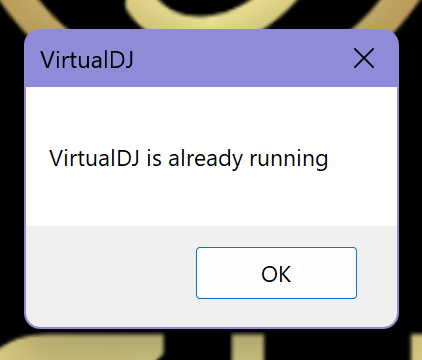
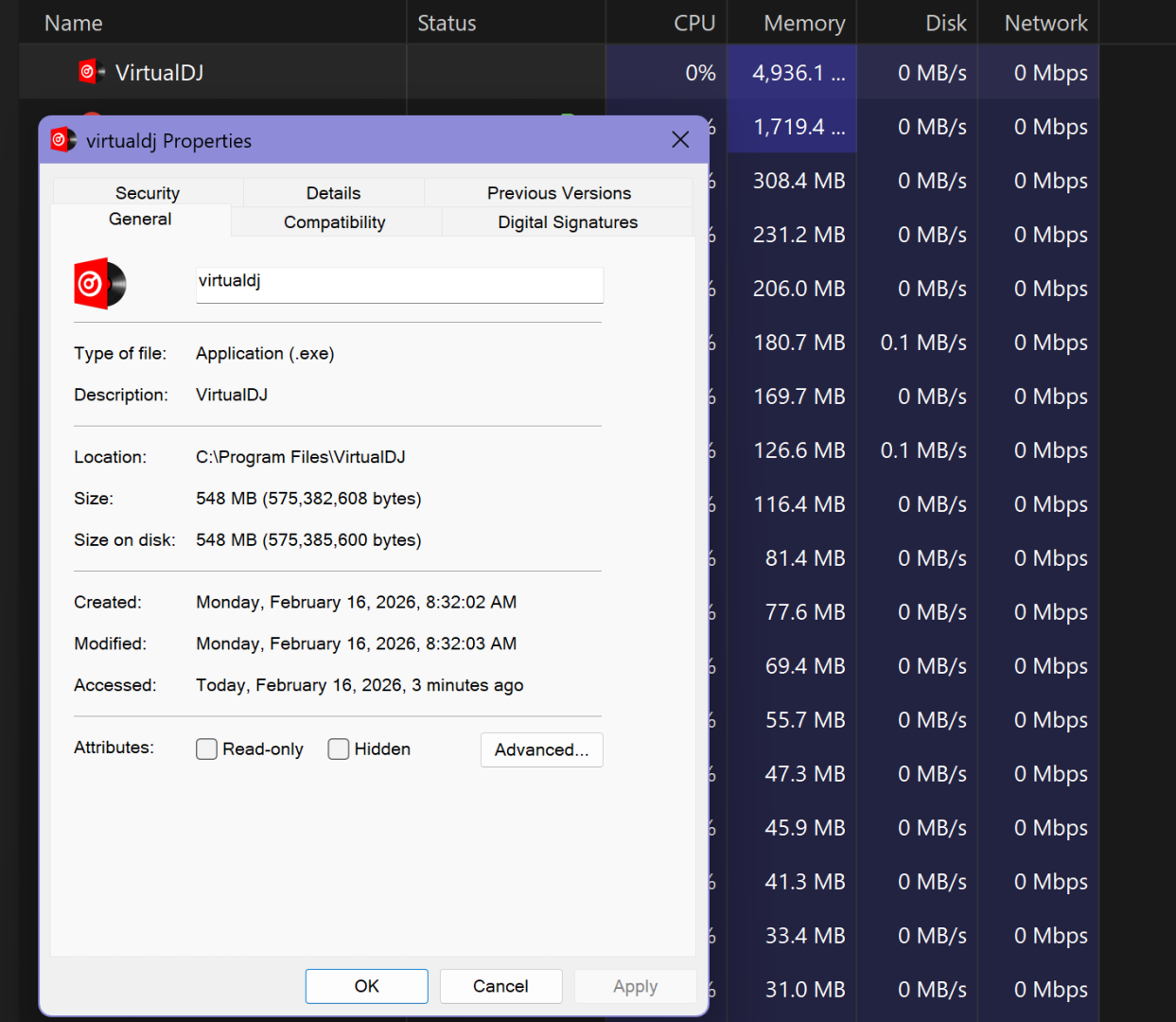
I have tried killing the process by running task manager in Administrator Mode, and that does not work. The only solution I have found is a full reboot. Has anyone else run into this issue recently? What did you do to resolve it?
I have tried killing the process by running task manager in Administrator Mode, and that does not work. The only solution I have found is a full reboot. Has anyone else run into this issue recently? What did you do to resolve it?
Posted Mon 16 Feb 26 @ 3:39 pm
 djdad
djdad
Something prevents VDJ to release some device, usually a sound card.
In this case, i strongly recommend to either have exclusiveaudioAccess setting in VDJ set to Yes, or (imo much better), to make sure the sound card you use in VDJ audio setup is not the Operating system default playback device.
In this case, i strongly recommend to either have exclusiveaudioAccess setting in VDJ set to Yes, or (imo much better), to make sure the sound card you use in VDJ audio setup is not the Operating system default playback device.
Posted Mon 16 Feb 26 @ 4:30 pm
musicbycsharp
djdad wrote :
Something prevents VDJ to release some device, usually a sound card.
In this case, i strongly recommend to either have exclusiveaudioAccess setting in VDJ set to Yes, or (imo much better), to make sure the sound card you use in VDJ audio setup is not the Operating system default playback device.
In this case, i strongly recommend to either have exclusiveaudioAccess setting in VDJ set to Yes, or (imo much better), to make sure the sound card you use in VDJ audio setup is not the Operating system default playback device.
Thanks. The exclusiveaudioAccess was not set to "yes'. So, i changed that. In the Audio setup, the hardware sound options are using a splitter, computer audio, and USB soundcard. Are you suggestion that you would use the USB soundcard? Or are you saying that in the windows settings when the controller is connected ensure that the controller is being used by system and not the PC speakers/mic? Thanks in advance for the clarification.
Posted Tue 17 Feb 26 @ 5:44 pm
 ComputerJuice
Having the exact same issue. Began after last update. Also VDJ wont save any changes I make upon closing... I think because its not actually closing.
Posted Mon 23 Feb 26 @ 7:27 am
 patfou
Même problème VDJ utilisé sur Denon Prime 4+ et lors de la fermeture, d'abord éteindre Denon puis fermer VDJ et là ne se ferme pas et ce depuis MAJ de Windows. Quelqu'un aurait une idée pour régler le problème.
Précision, lors de la mise en route, schéma habituel, ouverture VDJ qui signale Asio n'a pu être ouvert ce qui est normal, puis Denon allumé et dirigé vers ordinateur et là par le passé tout se synchronisait, maintenant il faut fermer VDJ et réouvrir l'application et là ça fonctionne.
Quel est le problème ? Merci à tous
Précision, lors de la mise en route, schéma habituel, ouverture VDJ qui signale Asio n'a pu être ouvert ce qui est normal, puis Denon allumé et dirigé vers ordinateur et là par le passé tout se synchronisait, maintenant il faut fermer VDJ et réouvrir l'application et là ça fonctionne.
Quel est le problème ? Merci à tous
Posted Mon 23 Feb 26 @ 11:11 am
musicbycsharp
patfou wrote :
Même problème VDJ utilisé sur Denon Prime 4+ et lors de la fermeture, d'abord éteindre Denon puis fermer VDJ et là ne se ferme pas et ce depuis MAJ de Windows. Quelqu'un aurait une idée pour régler le problème.
Précision, lors de la mise en route, schéma habituel, ouverture VDJ qui signale Asio n'a pu être ouvert ce qui est normal, puis Denon allumé et dirigé vers ordinateur et là par le passé tout se synchronisait, maintenant il faut fermer VDJ et réouvrir l'application et là ça fonctionne.
Quel est le problème ? Merci à tous
Précision, lors de la mise en route, schéma habituel, ouverture VDJ qui signale Asio n'a pu être ouvert ce qui est normal, puis Denon allumé et dirigé vers ordinateur et là par le passé tout se synchronisait, maintenant il faut fermer VDJ et réouvrir l'application et là ça fonctionne.
Quel est le problème ? Merci à tous
translated for me: Same problem with VDJ used on a Denon Prime 4+. When closing it, I first have to turn off the Denon, then close VDJ, but it won't close. This has been happening since a Windows update. Does anyone have any idea how to fix this? To clarify, during startup, the usual process is: VDJ opens, then displays "ASIO could not be opened," which is normal. Then I turn on the Denon and connect it to the computer, and in the past, everything would synchronize. Now, I have to close VDJ and reopen the application for it to work.…
I have not figured out a solution. The idea of making VDJ connect to the sound card exclusively seems to work but it's not a viable solution for me. This prevents my audacity from recording my sets for example.
Posted Fri 27 Feb 26 @ 5:56 pm
musicbycsharp
musicbycsharp wrote :
Thanks. The exclusiveaudioAccess was not set to "yes'. So, i changed that. In the Audio setup, the hardware sound options are using a splitter, computer audio, and USB soundcard. Are you suggestion that you would use the USB soundcard? Or are you saying that in the windows settings when the controller is connected ensure that the controller is being used by system and not the PC speakers/mic? Thanks in advance for the clarification.
djdad wrote :
Something prevents VDJ to release some device, usually a sound card.
In this case, i strongly recommend to either have exclusiveaudioAccess setting in VDJ set to Yes, or (imo much better), to make sure the sound card you use in VDJ audio setup is not the Operating system default playback device.
In this case, i strongly recommend to either have exclusiveaudioAccess setting in VDJ set to Yes, or (imo much better), to make sure the sound card you use in VDJ audio setup is not the Operating system default playback device.
Thanks. The exclusiveaudioAccess was not set to "yes'. So, i changed that. In the Audio setup, the hardware sound options are using a splitter, computer audio, and USB soundcard. Are you suggestion that you would use the USB soundcard? Or are you saying that in the windows settings when the controller is connected ensure that the controller is being used by system and not the PC speakers/mic? Thanks in advance for the clarification.
Ive given this more thought. I can understand wanting exclusive right to the sound card for performance reason if the computer can't handle the multitasking sharing of the card. However, with a suitable machine this should not be a problem. This is what OS systems are designed to do.
Something recently changed in either a VDJ update or an OS update because I have never had to have exclusive access to the soundcard before. Also, having the setting on prevents me from using Audacity to record my sets or even having audacity working at the same time, which should not be the case.
Posted Fri 27 Feb 26 @ 6:00 pm
musicbycsharp
ComputerJuice wrote :
Having the exact same issue. Began after last update. Also VDJ wont save any changes I make upon closing... I think because its not actually closing.
It seems like I have to kill process explicitly in the Task Manager and sometimes I've had to reboot completely.
Posted Fri 27 Feb 26 @ 6:01 pm
 zzzonedotnet
I'm seeing this too.
I found that if I close VDJ prior to turning off my controller, VDJ closes normally.
On a related note, turning on my controller prior to starting VDJ is necessary for VDJ to recognize the controller.
Something changed but that's obvious. I wish someone would transparently identify the change.
I found that if I close VDJ prior to turning off my controller, VDJ closes normally.
On a related note, turning on my controller prior to starting VDJ is necessary for VDJ to recognize the controller.
Something changed but that's obvious. I wish someone would transparently identify the change.
Posted Fri 27 Feb 26 @ 10:52 pm
 DJJamieFox
Same here... VDJ (and Serato) both hang on my machine.
Posted Sat 28 Feb 26 @ 12:22 am
DJJamieFox
DJDAD mentioned in another post to follow this:
https://www.virtualdj.com/wiki/Win11-KB5074105.html
As I understand it, this update (KB5074105) upgraded the MIDI stack to MIDI 2.0. This is causing a clash with some DJ controller's USB drivers (Mine is a Rane Four). For my issue, I jumped the gun and am re-installing windows and will disable Windows Update Service to stop all updates.
https://www.virtualdj.com/wiki/Win11-KB5074105.html
As I understand it, this update (KB5074105) upgraded the MIDI stack to MIDI 2.0. This is causing a clash with some DJ controller's USB drivers (Mine is a Rane Four). For my issue, I jumped the gun and am re-installing windows and will disable Windows Update Service to stop all updates.
Posted Sat 28 Feb 26 @ 1:29 am
 deejay_willy
i think its because midi 2.0
Posted Sat 28 Feb 26 @ 5:36 am
DJJamieFox
Yep, Its a MIDI 2.0 stack that supposed to support MIDI 1.0 & MIDI 2.0. The USB driver just locks up on it. To test the theory, I re-installed Windows, stripped all the bloat and uninstalled updates KB5077241, KB5077181 & KB5074105. It runs perfectly. I paused all updates for 4 weeks and stopped & disabled the Windows Update Service. This tool will tell you if MIDI 2.0 is installed, you do not want it present on your machine.
https://github.com/microsoft/MIDI/releases/download/enablement-checker/midicheckservice_x64.zip
https://github.com/microsoft/MIDI/releases/download/enablement-checker/midicheckservice_x64.zip
Posted Sat 28 Feb 26 @ 6:34 am
musicbycsharp
DJJamieFox wrote :
Yep, Its a MIDI 2.0 stack that supposed to support MIDI 1.0 & MIDI 2.0. The USB driver just locks up on it. To test the theory, I re-installed Windows, stripped all the bloat and uninstalled updates KB5077241, KB5077181 & KB5074105. It runs perfectly. I paused all updates for 4 weeks and stopped & disabled the Windows Update Service. This tool will tell you if MIDI 2.0 is installed, you do not want it present on your machine.
https://github.com/microsoft/MIDI/releases/download/enablement-checker/midicheckservice_x64.zip
https://github.com/microsoft/MIDI/releases/download/enablement-checker/midicheckservice_x64.zip
Thanks. I'll check this out. I noticed that another update was released and installed yesterday before i saw this post. I am hoping it fixed this issue.
Posted Sat 28 Feb 26 @ 1:28 pm
DJJamieFox
musicbycsharp wrote :
Thanks. I'll check this out. I noticed that another update was released and installed yesterday before i saw this post. I am hoping it fixed this issue.
DJJamieFox wrote :
Yep, Its a MIDI 2.0 stack that supposed to support MIDI 1.0 & MIDI 2.0. The USB driver just locks up on it. To test the theory, I re-installed Windows, stripped all the bloat and uninstalled updates KB5077241, KB5077181 & KB5074105. It runs perfectly. I paused all updates for 4 weeks and stopped & disabled the Windows Update Service. This tool will tell you if MIDI 2.0 is installed, you do not want it present on your machine.
https://github.com/microsoft/MIDI/releases/download/enablement-checker/midicheckservice_x64.zip
https://github.com/microsoft/MIDI/releases/download/enablement-checker/midicheckservice_x64.zip
Thanks. I'll check this out. I noticed that another update was released and installed yesterday before i saw this post. I am hoping it fixed this issue.
You might want to stop the Windows Update Service because in my testing I saw that KB5077181 tries to install no matter what. The software I used was from Microsoft's GitHub to determine if MIDI 2.0 is active. You'll want to make sure its NOT active (driver: wdmaud2.drv). For Rane systems, I think it stems from their drivers being MIDI 1.0 and a combination of Microsoft's 'new' MIDI 2.0 Stack not wanting to drop down to MIDI 1.0 forcing MIDI 2.0 on the controller. What I do know is all this worked fine up until the update cycles last month. Let me also add that I do NOT think this is a VDJ issue as I had the exact same problem with Serato Pro.
Posted Sat 28 Feb 26 @ 2:11 pm
musicbycsharp
DJJamieFox wrote :
DJDAD mentioned in another post to follow this:
https://www.virtualdj.com/wiki/Win11-KB5074105.html
As I understand it, this update (KB5074105) upgraded the MIDI stack to MIDI 2.0. This is causing a clash with some DJ controller's USB drivers (Mine is a Rane Four). For my issue, I jumped the gun and am re-installing windows and will disable Windows Update Service to stop all updates.
https://www.virtualdj.com/wiki/Win11-KB5074105.html
As I understand it, this update (KB5074105) upgraded the MIDI stack to MIDI 2.0. This is causing a clash with some DJ controller's USB drivers (Mine is a Rane Four). For my issue, I jumped the gun and am re-installing windows and will disable Windows Update Service to stop all updates.
Has anyone been tracking updates to see if it's safe to update. I have my updates turned off at the moment.
Posted 2 days ago @ 7:57 pm
 Pete Brown
The inMusic (AKAI, Denon, RANE, m-audio) device drivers hang the service and that is likely what is preventing the app from closing.
If you are using the devices just for MIDI, uninstall the inMusic driver and use our in-box driver.
If you use them for audio + MIDI, then join our Discord server https://aka.ms/mididiscord and then look in the #start-here channel for instructions on how to disable the feature while we work with inMusic on the driver issue.
Pete
Microsoft
If you are using the devices just for MIDI, uninstall the inMusic driver and use our in-box driver.
If you use them for audio + MIDI, then join our Discord server https://aka.ms/mididiscord and then look in the #start-here channel for instructions on how to disable the feature while we work with inMusic on the driver issue.
Pete
Microsoft
Posted yesterday @ 5:56 pm