


I have two questions about the program Virtual DJ program and the console Pioneer DJ XDJ-RX3.
1. What should I do to prevent the CUE button from lighting up automatically when uploading (during song upload) in Virtual DJ connected to the Pioneer DJ XDJ-RX3 console?
2. How to change and where in the track tag so that the track displays the artist and track name in the Pioneer DJ XDJ-RX3 console using Virtual DJ, for example Dr.Alban - It's My Life, and not the name of the song itself. Thank you in advance for any information and help.
Krzysztof
1. What should I do to prevent the CUE button from lighting up automatically when uploading (during song upload) in Virtual DJ connected to the Pioneer DJ XDJ-RX3 console?
2. How to change and where in the track tag so that the track displays the artist and track name in the Pioneer DJ XDJ-RX3 console using Virtual DJ, for example Dr.Alban - It's My Life, and not the name of the song itself. Thank you in advance for any information and help.
Krzysztof
Posted Sat 31 Jan 26 @ 10:03 pm
As for point 1, I will clarify exactly what I mean. When you load a track onto the right or left deck in software Virtual DJ on the Pioneer DJ XDJ-RX3, the CUE button lights up automatically. As in the picture below.
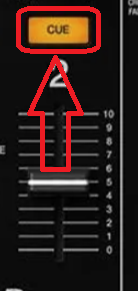
And I have the following programme settings.
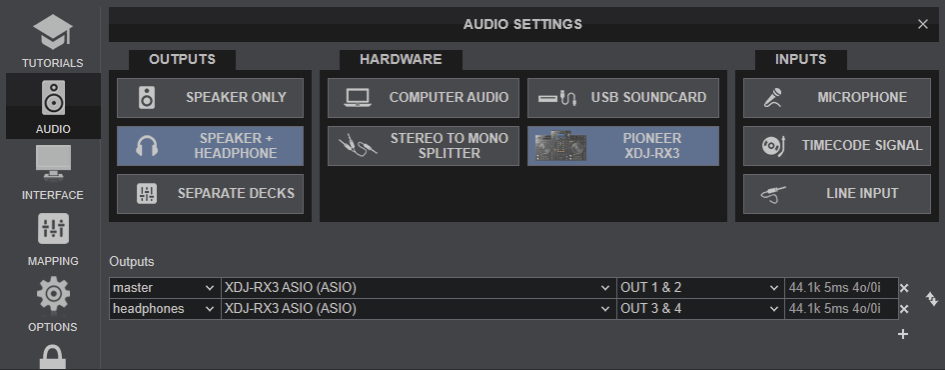
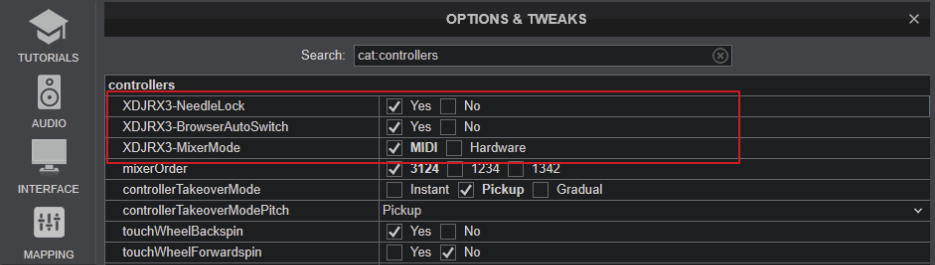
My question is as follows. How to prevent the CUE button from automatically turning on when loading to the left or right deck in Virtual DJ?
As for point 2, I will clarify exactly what I mean. I want the artist and song title to be listed in the bar below. And not just the title of the song.
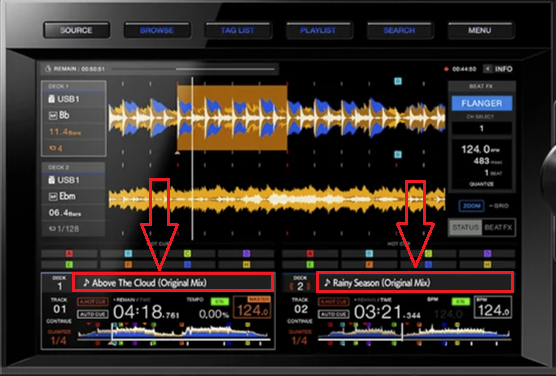
And I have the following programme settings.
My question is as follows. How to prevent the CUE button from automatically turning on when loading to the left or right deck in Virtual DJ?
As for point 2, I will clarify exactly what I mean. I want the artist and song title to be listed in the bar below. And not just the title of the song.
Posted Sun 01 Feb 26 @ 5:59 am
As for point 2 - I have already found a solution. I noticed that there is a serious error in the Virtual DJ program and reading the tag in the song. I will describe the whole problem in a moment. I have several sections in the song tag. If we enter the artist and track name in the "Artist" field, the text will be displayed correctly, for example Dr. Alban - It's My Life. However, if we enter the artist and song title in the "Title" field, Virtual DJ reads it incorrectly. Let me give you an example - in the "Title" column I have entered Dr. Alban - It's My Life. The program read it as follows: It's My Life - Dr. Alban. As you can see, the programme has reversed the entire inscription ‘Title’ - When uploading to the deck. I consider this a mistake, because a serious person gives the artist first and then the title of the song. As for the first point, I have not yet found a solution to the problem.I also think everyone has their own approach to the CUE button on the console. Some people like it when the button turns on automatically - others don't.
Posted Sun 01 Feb 26 @ 8:04 am
 groovindj
Thanks for clarifying because when you first posted, I assumed you were referring to the cue on the decks, not the mixer. In the settings, change autoHeadphones to 'no'.
As for the RX3, I believe the display is fixed in the Pioneer firmware on the unit, so cannot be modified. That's why it has the Pioneer style and not a VDJ skin.
As for the RX3, I believe the display is fixed in the Pioneer firmware on the unit, so cannot be modified. That's why it has the Pioneer style and not a VDJ skin.
Posted Sun 01 Feb 26 @ 10:31 am
 PhantomDeejay
About 1:
As groovindj said, change "autoHeadphones" setting to "no"
About 2:
The controller (XDJ-RX3) screen is designed to show TRACK'S TITLE
Not a combo of Artist - Title.
So, VirtualDJ does exactly that. It sends the info of the "TITLE" field on the screen.
It CANNOT send "Artist - Title" on the main screen shown on your screenshot because the same data are used for track info panel.
Now, I don't know what you're trying to do, but as long as you put "something" on the Title field of the Tag Editor, it should be shown on XDJ-RX3 main display.
PS: You cannot have a track without artist and without title in VirtualDJ. If you leave both fields blank then the filename will get used.
PS2: When a file has no tags, VirtualDJ always parses the filename as Artist - Title (Remix)
As groovindj said, change "autoHeadphones" setting to "no"
About 2:
The controller (XDJ-RX3) screen is designed to show TRACK'S TITLE
Not a combo of Artist - Title.
So, VirtualDJ does exactly that. It sends the info of the "TITLE" field on the screen.
It CANNOT send "Artist - Title" on the main screen shown on your screenshot because the same data are used for track info panel.
Now, I don't know what you're trying to do, but as long as you put "something" on the Title field of the Tag Editor, it should be shown on XDJ-RX3 main display.
PS: You cannot have a track without artist and without title in VirtualDJ. If you leave both fields blank then the filename will get used.
PS2: When a file has no tags, VirtualDJ always parses the filename as Artist - Title (Remix)
Posted Sun 01 Feb 26 @ 4:45 pm
groovindj wrote :
Thanks for clarifying because when you first posted, I assumed you were referring to the cue on the decks, not the mixer. In the settings, change autoHeadphones to 'no'.
As for the RX3, I believe the display is fixed in the Pioneer firmware on the unit, so cannot be modified. That's why it has the Pioneer style and not a VDJ skin.
As for the RX3, I believe the display is fixed in the Pioneer firmware on the unit, so cannot be modified. That's why it has the Pioneer style and not a VDJ skin.
Thank you very much for all your help – your advice was helpful.
Posted Sun 01 Feb 26 @ 5:38 pm
PhantomDeejay wrote :
About 1:
As groovindj said, change "autoHeadphones" setting to "no"
About 2:
The controller (XDJ-RX3) screen is designed to show TRACK'S TITLE
Not a combo of Artist - Title.
So, VirtualDJ does exactly that. It sends the info of the "TITLE" field on the screen.
It CANNOT send "Artist - Title" on the main screen shown on your screenshot because the same data are used for track info panel.
Now, I don't know what you're trying to do, but as long as you put "something" on the Title field of the Tag Editor, it should be shown on XDJ-RX3 main display.
PS: You cannot have a track without artist and without title in VirtualDJ. If you leave both fields blank then the filename will get used.
PS2: When a file has no tags, VirtualDJ always parses the filename as Artist - Title (Remix)
As groovindj said, change "autoHeadphones" setting to "no"
About 2:
The controller (XDJ-RX3) screen is designed to show TRACK'S TITLE
Not a combo of Artist - Title.
So, VirtualDJ does exactly that. It sends the info of the "TITLE" field on the screen.
It CANNOT send "Artist - Title" on the main screen shown on your screenshot because the same data are used for track info panel.
Now, I don't know what you're trying to do, but as long as you put "something" on the Title field of the Tag Editor, it should be shown on XDJ-RX3 main display.
PS: You cannot have a track without artist and without title in VirtualDJ. If you leave both fields blank then the filename will get used.
PS2: When a file has no tags, VirtualDJ always parses the filename as Artist - Title (Remix)
Unfortunately, I disagree with you here. I spent about 5 hours with my laptop at the console to solve this problem. And I managed to solve this problem. First, I will show you how I have all the tags made with my songs.

The only correct solution is to select the option I have marked in red.

Other options didn't help.
Posted Sun 01 Feb 26 @ 5:47 pm
PhantomDeejay
Krzysztof Grzelak wrote :
Unfortunately, I disagree with you here. I spent about 5 hours with my laptop at the console to solve this problem. And I managed to solve this problem.
What problem ?
What exact problem did you try to solve ?
As I told you, the XDJ-RX3 screen is supposed to show the TITLE field on it's main screen.
Putting "Artist - Title" on the TITLE field on the Tag Editor is a "hack" not a solution.
Then this "hack" may cause other issues that may or may not need to use other settings to solve.
So, what exactly was the problem ?
If you absolutely want to see "Artist - Title" on XDJ-RX3 main screen, then you should remap the corresponding key.. Not "hack" your entire database.
So, if you absolutely need/want/must see "Artist - Title" on XDJ-RX3 main screen, then remap TEXT_TITLE key of your mapper to load_pulse 50ms ? get_artist_title : get_text ' '
The drawback is that now on other parts of the screen you'll see "Artist" twice.
If you open the info tab of the XDJ-RX3 screen now you'll see
Artist: C.C. Catch
Title: C.C. Catch - Cause you are young.
But I guess that's ok with you if you're willing to do this on your entire database as shown by the screenshot of your Tag Editor.
Posted Mon 02 Feb 26 @ 10:33 am
PhantomDeejay wrote :
What problem ?
What exact problem did you try to solve ?
As I told you, the XDJ-RX3 screen is supposed to show the TITLE field on it's main screen.
Putting "Artist - Title" on the TITLE field on the Tag Editor is a "hack" not a solution.
Then this "hack" may cause other issues that may or may not need to use other settings to solve.
So, what exactly was the problem ?
If you absolutely want to see "Artist - Title" on XDJ-RX3 main screen, then you should remap the corresponding key.. Not "hack" your entire database.
So, if you absolutely need/want/must see "Artist - Title" on XDJ-RX3 main screen, then remap TEXT_TITLE key of your mapper to load_pulse 50ms ? get_artist_title : get_text ' '
The drawback is that now on other parts of the screen you'll see "Artist" twice.
If you open the info tab of the XDJ-RX3 screen now you'll see
But I guess that's ok with you if you're willing to do this on your entire database as shown by the screenshot of your Tag Editor.
What problem ?
What exact problem did you try to solve ?
As I told you, the XDJ-RX3 screen is supposed to show the TITLE field on it's main screen.
Putting "Artist - Title" on the TITLE field on the Tag Editor is a "hack" not a solution.
Then this "hack" may cause other issues that may or may not need to use other settings to solve.
So, what exactly was the problem ?
If you absolutely want to see "Artist - Title" on XDJ-RX3 main screen, then you should remap the corresponding key.. Not "hack" your entire database.
So, if you absolutely need/want/must see "Artist - Title" on XDJ-RX3 main screen, then remap TEXT_TITLE key of your mapper to load_pulse 50ms ? get_artist_title : get_text ' '
The drawback is that now on other parts of the screen you'll see "Artist" twice.
If you open the info tab of the XDJ-RX3 screen now you'll see
Artist: C.C. Catch
Title: C.C. Catch - Cause you are young.
But I guess that's ok with you if you're willing to do this on your entire database as shown by the screenshot of your Tag Editor.
First of all, thank you for your answer. Can you write exactly where I can find the entry load_pulse 50ms ? get_artist_title : get_text ' ' because I can't seem to find it.
Posted Tue 03 Feb 26 @ 1:49 pm
 locoDog
remap to TEXT_TITLE key
Posted Tue 03 Feb 26 @ 1:54 pm
locoDog wrote :
remap to TEXT_TITLE key
Thank you very much for the information.
Posted Tue 03 Feb 26 @ 6:07 pm
I will return to the topic because I have a question. I noticed that during the stream with subtitles the band's name appears twice. Can this be fixed so that the band name appears only once?
Posted Sat 21 Feb 26 @ 8:09 am