


 DJ Faber Zee
Thanks guys.
Posted Sun 25 Jan 26 @ 3:52 pm
 groovindj
There's a new one. Reloop Flux Go.
https://www.reloop.com/reloop-flux-go
https://www.reloop.com/reloop-flux-go
Posted Sun 25 Jan 26 @ 4:09 pm
DJ Faber Zee
Other random dumb questions 😅
I have a friend who use dvs on traktor with a couple of Technics 1200 a TRAKTOR AUDIO 6 sound card, an analog mixer and Traktor timecoded vinyls.
Is this configuration compatible with VirtualDJ?
And another one
I am planning to buy VirtualDJ timecoded vinyls...but for istance I go on a club and they have an analog mixer with a Traktor sound card compatible with VirtualDJ.
Can i use my VirtualDJ timecoded vinyls and use dvs functionalities?
Thanks!
I have a friend who use dvs on traktor with a couple of Technics 1200 a TRAKTOR AUDIO 6 sound card, an analog mixer and Traktor timecoded vinyls.
Is this configuration compatible with VirtualDJ?
And another one
I am planning to buy VirtualDJ timecoded vinyls...but for istance I go on a club and they have an analog mixer with a Traktor sound card compatible with VirtualDJ.
Can i use my VirtualDJ timecoded vinyls and use dvs functionalities?
Thanks!
Posted Mon 26 Jan 26 @ 12:29 pm
 DJ VinylTouch
That soundcard was listed under initial soundcards link you gave, so you shouldn't have to do anything extra (the audio config should be done on plug-in + selection of that soundcard as source).
Everything else will work as described before - supported timecode signal (source = VirtualDJ Timecode records), soundcard with inputs to route the signal to VirtualDJ for processing with adequate amplification (Traktor Audio A6), a way to play and manipulate the signal (turntable to play the timecode record).
Everything else will work as described before - supported timecode signal (source = VirtualDJ Timecode records), soundcard with inputs to route the signal to VirtualDJ for processing with adequate amplification (Traktor Audio A6), a way to play and manipulate the signal (turntable to play the timecode record).
Posted Mon 26 Jan 26 @ 2:10 pm
DJ Faber Zee
DJ VinylTouch wrote :
That soundcard was listed under initial soundcards link you gave, so you shouldn't have to do anything extra (the audio config should be done on plug-in + selection of that soundcard as source).
Everything else will work as described before - supported timecode signal (source = VirtualDJ Timecode records), soundcard with inputs to route the signal to VirtualDJ for processing with adequate amplification (Traktor Audio A6), a way to play and manipulate the signal (turntable to play the timecode record).
Everything else will work as described before - supported timecode signal (source = VirtualDJ Timecode records), soundcard with inputs to route the signal to VirtualDJ for processing with adequate amplification (Traktor Audio A6), a way to play and manipulate the signal (turntable to play the timecode record).
Thanks...this Wednesday I will go and test...can't wait!
Posted Mon 26 Jan 26 @ 2:53 pm
DJ Faber Zee
Hello...I have another (hopefully last) dummy question..
I'd like to setup the silent cue for both of the decks...my setup will be always VirtualDJ laptop + DDJ-XP2 plus 2 turntables, 1 mixer with one sound card or one digital mixer... I have my VDJ library (all songs) with all the cue points and loops already set.
Given the above...how I can set up silent cue on both turntables so I can press my cue point to start immediately while my fader is open?
I'd like to setup the silent cue for both of the decks...my setup will be always VirtualDJ laptop + DDJ-XP2 plus 2 turntables, 1 mixer with one sound card or one digital mixer... I have my VDJ library (all songs) with all the cue points and loops already set.
Given the above...how I can set up silent cue on both turntables so I can press my cue point to start immediately while my fader is open?
Posted Mon 26 Jan 26 @ 4:03 pm
DJ VinylTouch
If I'm not mistaken, the DDJ-XP2 is already mapped with a Silent Cue button for both decks, so you just would have to start the turntable playing, press silent cue on the deck in question, place the faders so that the deck would be audible if silent cue wasn't active, then press a hotcue when you want to drop the song in at that point.
If you want to explicitly map something, set a custom button or custom pad button to the verb silent_cue (the default script behavior is already deck aware).
If you want to explicitly map something, set a custom button or custom pad button to the verb silent_cue (the default script behavior is already deck aware).
Posted Mon 26 Jan 26 @ 4:15 pm
DJ Faber Zee
Ok cool i will map it on my DDJ-XP2 first page where I have play button and cue button when I use CDJs.
Thanks!
Thanks!
Posted Mon 26 Jan 26 @ 4:26 pm
 Djaminhi
No scratching?!
Not criticism; I only use DVS for that old school feel and scratch experience of real vinyl.
You want to keep your tracks in time using DVS?
This i find very challenging.....
BTW
I use technics1200mk2, traktor timecode vinyl with a traktor audio 6, and Ortofon Concorde MKII MIX head shells / needles....this works very well for me.
Not criticism; I only use DVS for that old school feel and scratch experience of real vinyl.
You want to keep your tracks in time using DVS?
This i find very challenging.....
BTW
I use technics1200mk2, traktor timecode vinyl with a traktor audio 6, and Ortofon Concorde MKII MIX head shells / needles....this works very well for me.
Posted Mon 26 Jan 26 @ 10:09 pm
DJ Faber Zee
djaminhi wrote :
No scratching?!
Not criticism; I only use DVS for that old school feel and scratch experience of real vinyl.
You want to keep your tracks in time using DVS?
This i find very challenging.....
BTW
I use technics1200mk2, traktor timecode vinyl with a traktor audio 6, and Ortofon Concorde MKII MIX head shells / needles....this works very well for me.
Not criticism; I only use DVS for that old school feel and scratch experience of real vinyl.
You want to keep your tracks in time using DVS?
This i find very challenging.....
BTW
I use technics1200mk2, traktor timecode vinyl with a traktor audio 6, and Ortofon Concorde MKII MIX head shells / needles....this works very well for me.
Unfortunately I cannot scratch...but thanks for your thoughts..
Posted Tue 27 Jan 26 @ 6:28 am
DJ Faber Zee
DJ VinylTouch wrote :
If I'm not mistaken, the DDJ-XP2 is already mapped with a Silent Cue button for both decks, so you just would have to start the turntable playing, press silent cue on the deck in question, place the faders so that the deck would be audible if silent cue wasn't active, then press a hotcue when you want to drop the song in at that point.
If you want to explicitly map something, set a custom button or custom pad button to the verb silent_cue (the default script behavior is already deck aware).
If you want to explicitly map something, set a custom button or custom pad button to the verb silent_cue (the default script behavior is already deck aware).
Sorry I just realized there's a dedicated button on DDJ-XP2...thanks!
Posted Tue 27 Jan 26 @ 9:02 am
DJ Faber Zee
Guys... everything is working but I cannot record the djset...The record button is not clickable.. I believe its an audio setup issue...
Here what I see in the audio config.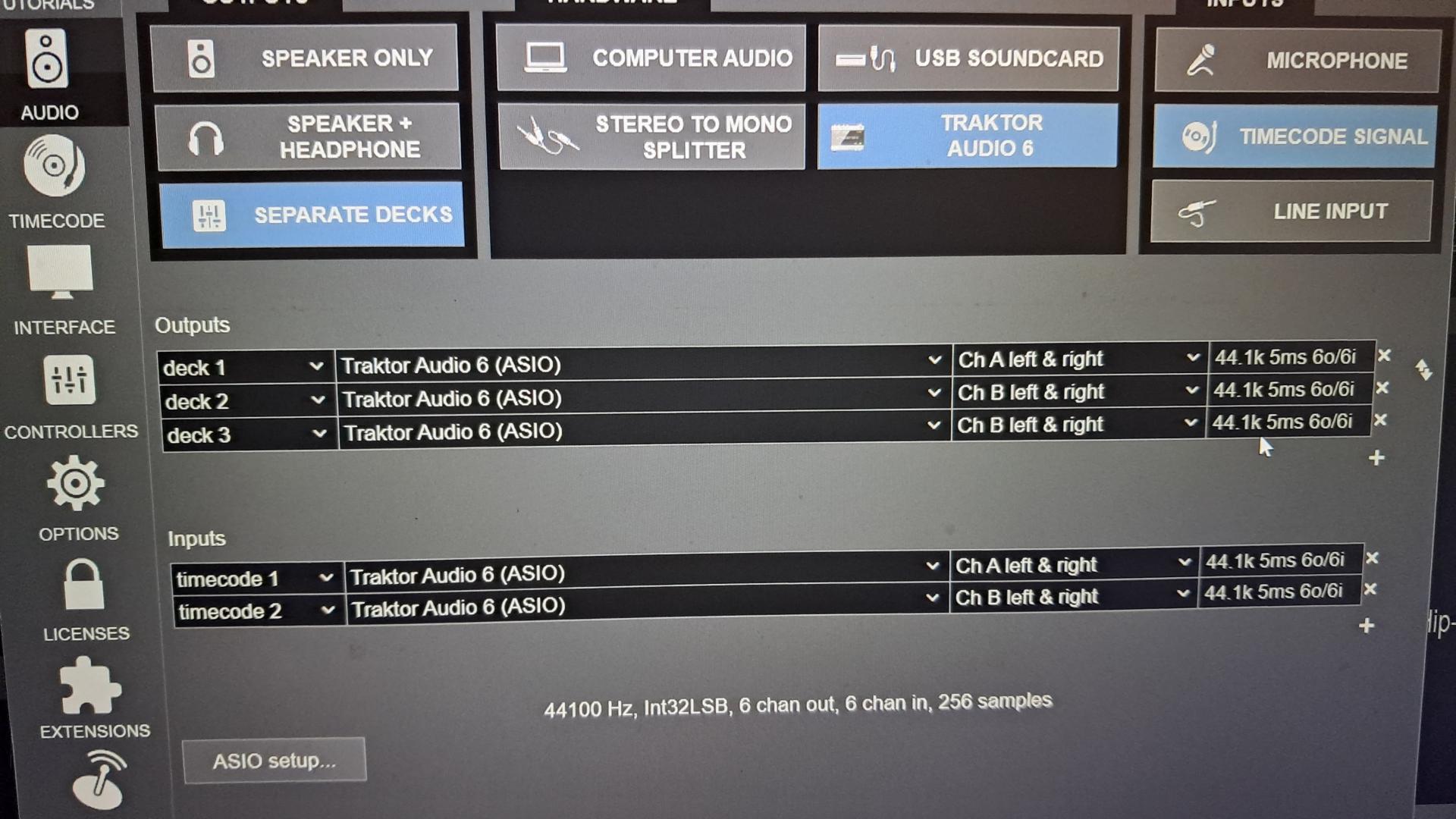
Here what I see in the audio config.
Posted Wed 28 Jan 26 @ 2:46 pm
groovindj
That's normal. If you're using an external mixer setup then the internal mixer is not being used - so there's no "master output" to record from.
Posted Wed 28 Jan 26 @ 2:56 pm
DJ Faber Zee
Actually I connected the mixer Rec out two RCA to the sound card Rec IN adding a new input channel on virtualdj audio configuration and it works...
Thanks guys!
Thanks guys!
Posted Wed 28 Jan 26 @ 3:25 pm