


 BriansBoombox
Since version 2026, I have this problem. After a couple hours, one of the decks will go silent. I can use the other deck. The fix is restarting Virtual DJ. It's not the cross fader. I am running USB sound to a mixer. I don't think its the DJ2Go or the Yamaha mixer because restarting Virtual DJ fixes it and the Yamaha has one USB input. Like I said, the remaing deck will still work. When 2026 came out, it did it once per night (4 hours of play) This weekend, I had to restart VirtualDJ every hour. This is bad. Hope this is fixed soon. I never had this problem prior to version 2026. I am currently b9004 on a Windows 11 Pro w an i9 screamin fast PC.
Posted Sun 11 Jan 26 @ 3:15 pm
 DJ VinylTouch
You've not given much for the devs to start with.
Maybe start by describing the folliwing:
Maybe start by describing the folliwing:
- Your OS Version
- Laptop specs
- VirtualDJ version
- Controllers involved/connected and how they are connect to your computer (like if you are using a USB Hub or direct)
- Whether or not you are using the factory default mapping for the controllers in question
If you aren't, detail any relevant remapping you may have done - A description or screenshot of your audio setup
- Any other custom scripts you may be using as mappings (custom buttons, keyboard shortcuts, pad mode mappings)
- An actual description of what you were doing when you experienced the problem
Posted Sun 11 Jan 26 @ 3:35 pm
BriansBoombox
Windows 11 Pro 25H2
12th Gen Intel i9-12900H, 32GB ram, 8GB video ram, 5TB internal SSD drives,
VirtualDJ version v2026 b9004
Controllers involved/connected and how they are connect to your computer (like if you are using a USB Hub or direct)
I am using a DJ2Go2 Touch for some control and as a audio device for headphones. I am not using the main output on that controller. This is directly connected to my labtop. No Hubs. I only use the headphones about 5% of the time.
I am using a USB connection to my Yamaha MG12XU 12-channel Mixer. There is no hub. This is my main sound output.
I let Virtual DJ record my shows so the record input is there.
I have deleted all keyboard mappings except ALT+SPACE mix_now_nosync and Z browser_zoom My ONINIT is master_volume 20% & Mono_Mix.
DJ2GO2 mapping: The pad buttons have been remapped. One turns on and off the stems voice. PAD4 forces the video oputut on the video master. I have remapped the Browser Push button to select the karaoke video_fx and enable it. It also selects a cool shader if its an audio only file.
I am using Telly Visuals. The only reason I do this is for text scroll along the bottom on the screen. I got virtual DJ to display my logo swaying in the upper right hand corner. I forgot how I did this. its playing a GIF or short .MP4
I run a karaoke/DJ show. I do NOT use any karaoke plugin that came with Virtual DJ or their website. I have been playing karaoke zip files, music vids from Xtendamix, ocassionally a Deezer audio or MP3. This has been working for years. Normally, what I do is switch up from deck to deck. I only really "mix" 3 or 4 tracks per night.
New since version 2026, I have used the karaoke video fx. I cut the vocal stem and let the singer handle that. This is working better than I thought it ever would. I have a button that turns on the FX. The same button turns it off. Another button will cut the vocals. Oh, I have one of the knobs vary the recorded vocals in case the live singer needs help. I also have been testing out the VinylBrake, EchoeOut and StutterOut I use these when I want to stop the music that is playing between singers.
My best description as to what I was doing when the problem occurred: I load a song in a deck. It plays with no audio. Video still works. The thing is, maybe it died when I did the VinylBrake. I wouldn't have known it was ka-put until the other deck was done. The song type doesn't matter. Only restarting VDJ fixes it. Last weekend, it was 1 time per hour. The weekend before that, it was just one time. I will try NOT using the new effects.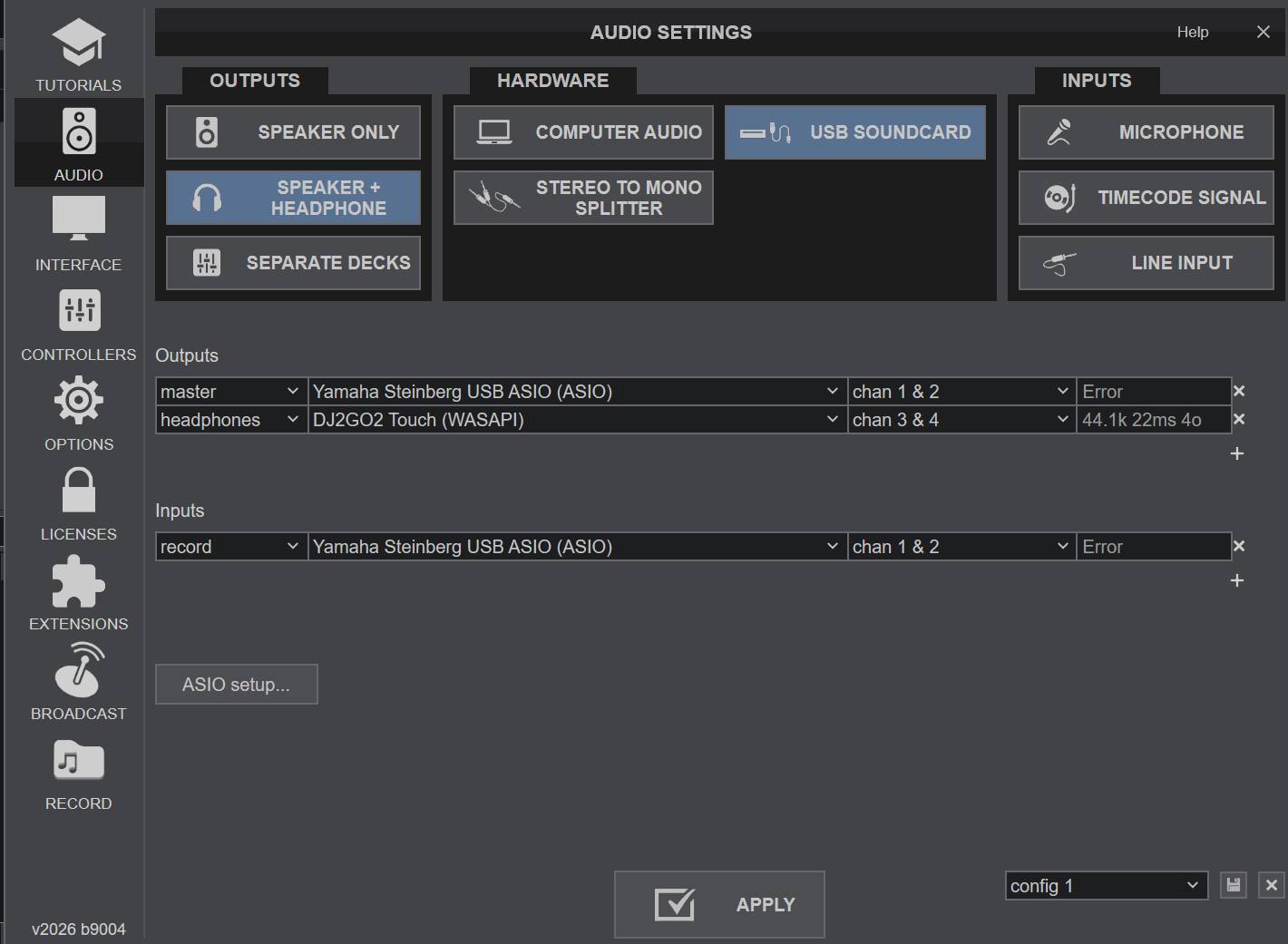
It says error on the screenshot because I am in my office.
12th Gen Intel i9-12900H, 32GB ram, 8GB video ram, 5TB internal SSD drives,
VirtualDJ version v2026 b9004
Controllers involved/connected and how they are connect to your computer (like if you are using a USB Hub or direct)
I am using a DJ2Go2 Touch for some control and as a audio device for headphones. I am not using the main output on that controller. This is directly connected to my labtop. No Hubs. I only use the headphones about 5% of the time.
I am using a USB connection to my Yamaha MG12XU 12-channel Mixer. There is no hub. This is my main sound output.
I let Virtual DJ record my shows so the record input is there.
I have deleted all keyboard mappings except ALT+SPACE mix_now_nosync and Z browser_zoom My ONINIT is master_volume 20% & Mono_Mix.
DJ2GO2 mapping: The pad buttons have been remapped. One turns on and off the stems voice. PAD4 forces the video oputut on the video master. I have remapped the Browser Push button to select the karaoke video_fx and enable it. It also selects a cool shader if its an audio only file.
I am using Telly Visuals. The only reason I do this is for text scroll along the bottom on the screen. I got virtual DJ to display my logo swaying in the upper right hand corner. I forgot how I did this. its playing a GIF or short .MP4
I run a karaoke/DJ show. I do NOT use any karaoke plugin that came with Virtual DJ or their website. I have been playing karaoke zip files, music vids from Xtendamix, ocassionally a Deezer audio or MP3. This has been working for years. Normally, what I do is switch up from deck to deck. I only really "mix" 3 or 4 tracks per night.
New since version 2026, I have used the karaoke video fx. I cut the vocal stem and let the singer handle that. This is working better than I thought it ever would. I have a button that turns on the FX. The same button turns it off. Another button will cut the vocals. Oh, I have one of the knobs vary the recorded vocals in case the live singer needs help. I also have been testing out the VinylBrake, EchoeOut and StutterOut I use these when I want to stop the music that is playing between singers.
My best description as to what I was doing when the problem occurred: I load a song in a deck. It plays with no audio. Video still works. The thing is, maybe it died when I did the VinylBrake. I wouldn't have known it was ka-put until the other deck was done. The song type doesn't matter. Only restarting VDJ fixes it. Last weekend, it was 1 time per hour. The weekend before that, it was just one time. I will try NOT using the new effects.
It says error on the screenshot because I am in my office.
Posted Fri 16 Jan 26 @ 2:37 pm
DJ VinylTouch
So just quickly looking through the content, you said you started experimenting with Vinyl Brake, Echo Out, etc (which are effects that kill the sound after completion), and noticed that loading new songs had no audio, but the video is playing - that most likely indicates the audio effect is still active, so you have a couple of things to check
The real summary here though is, when you switch on an effect, ensure you know how it turns off (normally it needs manual interaction to do that).
- If you enable effects via the pad (e.g. stems+fx pad page)
I think by default that stays activated even on losd of new songs. You can check if that is still enabled (the pad normally is still highlighted to show that it is active) and disable it. - If you enabled it via the regular FX psrt of a skin
resetFXOnLoad is an option that controls effect reset/disabling on load of a new song, and I think by default that is set to No (with good) reason - if you have a physical toggle switch that has a latched on position, switching this to on may havve weird results with software effect).
You can try switching that to on.
The real summary here though is, when you switch on an effect, ensure you know how it turns off (normally it needs manual interaction to do that).
Posted Fri 16 Jan 26 @ 4:24 pm
BriansBoombox
VinylTouch,
Wise one, you are absolutely correct.
I can see the differences between VinylBrake and BrakeStart and how they behave. I assumed they would be the same when complete. I appreciate you speed with the solution. I appreciate your suggested solution. I may implement that right now. Thanks again!
Wise one, you are absolutely correct.
I can see the differences between VinylBrake and BrakeStart and how they behave. I assumed they would be the same when complete. I appreciate you speed with the solution. I appreciate your suggested solution. I may implement that right now. Thanks again!
Posted Fri 16 Jan 26 @ 4:49 pm
DJ VinylTouch
Glad to be helpful/hear that your issue is resolved 🍺.
I occassionally forget pad FX on for new deck loads as well - it happens so often that I force myself to check before continuing with the deck as routine.
I occassionally forget pad FX on for new deck loads as well - it happens so often that I force myself to check before continuing with the deck as routine.
Posted Fri 16 Jan 26 @ 9:09 pm
mink chung
solution to keep my brain on other things: keep "resetFXonLoad" to [yes]
Posted Fri 27 Mar 26 @ 6:11 pm