


 DJ VinylTouch
I agree with that. TBH all the tracks I've thrown at it, I've checked after and maybe the one or two odd ones I had to fix, but for the vast majority of the older tracks I've tried, it works well, and it is definitely way better than the original multi BPM analysis that was present.
With every tool one has to know how and when it should be used most effectively otherwise you will run into a time where it could do something undesireable (and that's especially true for AI based tools).
With every tool one has to know how and when it should be used most effectively otherwise you will run into a time where it could do something undesireable (and that's especially true for AI based tools).
Posted Wed 08 Apr 26 @ 11:04 am
 groovindj
I've just been enjoying being able to easily sync classic drum loops (i.e. funky drummer, amen brother) over tracks now, without having to break out Ableton Live. 👍
Posted Wed 08 Apr 26 @ 11:10 am
 DJ Faber Zee
Yeah @groovin and I like to create LIVE Original Sample + New Song mixes finally 😅
PS most of djs in my local scene they don't even know what we are talking about lol 😅
PS most of djs in my local scene they don't even know what we are talking about lol 😅
Posted Wed 08 Apr 26 @ 11:13 am
DJ VinylTouch
Oh trust they know know, especially with the Serato 4.0 release and how it was received.
I always was looked at like the odd technical person that just wants to use different software for no reason, but when I started show them things that couldn't easily be done or done at all in Serato (some custom mappings and stems back when Serato had no stems), people started looking.
I always was looked at like the odd technical person that just wants to use different software for no reason, but when I started show them things that couldn't easily be done or done at all in Serato (some custom mappings and stems back when Serato had no stems), people started looking.
Posted Wed 08 Apr 26 @ 11:42 am
DJ Faber Zee
Consider in Milano they mostly(for my knowledge) play tech house or italo disco...some low pass filter and echo for the build up....that's it 😅
Posted Wed 08 Apr 26 @ 11:49 am
DJ Faber Zee
Anyway VDJ is light years ahead from the rest of DJ software market...we were just missing fluid Beatgrid to be back on top ✨️❤️🔥
Posted Wed 08 Apr 26 @ 11:51 am
groovindj
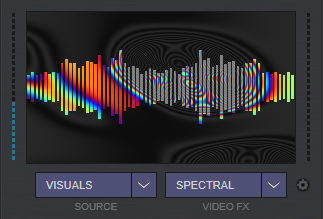
I like the update to spectral too!
Posted Wed 08 Apr 26 @ 12:18 pm
DJ Faber Zee
Browser Info tab shows fluid bpm
Actually in the latest early access release.
Can someone explain please? 🙏🏾
Posted Sun 12 Apr 26 @ 5:14 am
 Adion
Adion
9295 now in Early Access with three changes for fluid:
-The browser info tab shows fluid bpm:
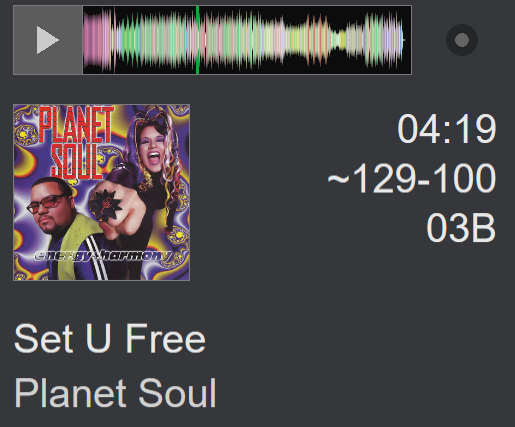
It will show the ~ in front of the bpm just like in the browser to indicate that it's fluid, and if there are big variations, it will also show the minimum and maximum bpm throughout the track.
It also orders the bpm's shown, so if the low bpm is closer near the end of the track it will be shown last
-The bpm shown on the deck is now more precise for stable but small changes.
Drummer fluctuations are still averaged out as before, but if the bpm is consistently increasing/decreasing, this will be better reflected on the deck.
This does require to re-analyze the track though.
-The bpm editor will show x2 and /2 buttons in fluid mode as well when the track has a fairly consistent bpm. (If there's different areas with completely different bpm they still won't be shown, since it won't be clear which area you meant to change)
For most corrections this should be easier than having to change the detection range all the time
-The browser info tab shows fluid bpm:
It will show the ~ in front of the bpm just like in the browser to indicate that it's fluid, and if there are big variations, it will also show the minimum and maximum bpm throughout the track.
It also orders the bpm's shown, so if the low bpm is closer near the end of the track it will be shown last
-The bpm shown on the deck is now more precise for stable but small changes.
Drummer fluctuations are still averaged out as before, but if the bpm is consistently increasing/decreasing, this will be better reflected on the deck.
This does require to re-analyze the track though.
-The bpm editor will show x2 and /2 buttons in fluid mode as well when the track has a fairly consistent bpm. (If there's different areas with completely different bpm they still won't be shown, since it won't be clear which area you meant to change)
For most corrections this should be easier than having to change the detection range all the time
Posted Sun 12 Apr 26 @ 5:23 am
DJ Faber Zee
Wow thanks for both explaining and for listening to the forum suggestions ✨️
Posted Sun 12 Apr 26 @ 5:26 am
DJ Faber Zee
Will batch Fluid BPM analysis available in new release?
Posted Sun 12 Apr 26 @ 5:38 am
Adion
browsed_file_analyze fluid
Was already working before.
(Note that you probably want to be careful to use it only on tracks that need it though, for non-fluid tracks the precision of the stable analyzer will still be a bit better)
Was already working before.
(Note that you probably want to be careful to use it only on tracks that need it though, for non-fluid tracks the precision of the stable analyzer will still be a bit better)
Posted Sun 12 Apr 26 @ 5:46 am
DJ Faber Zee
Of course I will use on selected tracks... but actually if I select more than one track and right click "Analyze for BPM" it doesent analyze them FLUID....am I missing something?
Posted Sun 12 Apr 26 @ 5:49 am
Adion
Using the script I mentioned on a custom button should work.
Posted Sun 12 Apr 26 @ 5:50 am
DJ Faber Zee
Ah ok...I thought it was a feature of the software without having to create a script...thanks!
Posted Sun 12 Apr 26 @ 5:55 am
DJ VinylTouch
@Adion I would say that wide BPM change info showing the max and minimum BPM throughout is valuable in the BPM column for the browser too (what I had described/suggested way back on the Request Feature post) - if it isn't too much effort, could it be done if the column is widened enough? I honestly almost never have the File Info panel open - my focus is always in the browser track listing display to determine a track to play.
Posted Sun 12 Apr 26 @ 12:23 pm
groovindj
Agreed. In the browser and even on the decks would be useful (although probably involving skin mods). The more feedback we have on what the BPMs are doing, the better.
Posted Sun 12 Apr 26 @ 1:13 pm
 Dan (djtouchdan)
Probably having something like
bpm_rangein the browser would be good. That way it can be used in skin too and doesn’t modify the existing bpm field for those who are used to that.
Posted Sun 12 Apr 26 @ 1:53 pm
DJ Faber Zee
Yes in the browser list and in the deck info too please ✌🏾✨️🙏🏾
Posted Sun 12 Apr 26 @ 1:57 pm
 lakis69
Putting a lock on the bpm editor permanently... is there any thought to that?
Posted Sun 12 Apr 26 @ 7:24 pm