


 groovindj
I think maybe "V8 but by FRUiT" takes the prize for that (it's more than 10 years old now!).
Posted Wed 07 Jan 26 @ 7:56 pm
 PhantomDeejay
@Blckjck
Bug found and will be fixed on next update. Thanks!
Bug found and will be fixed on next update. Thanks!
Posted Wed 07 Jan 26 @ 8:01 pm
 blckjck
groovindj wrote :
I think maybe "V8 but by FRUiT" takes the prize for that (it's more than 10 years old now!).
I remember that one. It had a lot in it.
Posted Wed 07 Jan 26 @ 8:01 pm
 Mobile Zombie
Maybe you guys at VDJ should consider having such a beautiful skin as the "default"
Posted Thu 08 Jan 26 @ 5:43 pm

hi I have a Mac 2017 15" I love the skin but it shows up very small. can the decks be expanded?
Posted Fri 16 Jan 26 @ 3:12 pm
 AnthonyBLTZPLS
Thnx for the ( great ) update !!!
Can you pls add an oprion at deck screen info ( at line 3 ) for the musical Key ?
https://files.fm/u/msfdx7b72h
Can you pls add an oprion at deck screen info ( at line 3 ) for the musical Key ?
https://files.fm/u/msfdx7b72h
Posted Sun 18 Jan 26 @ 8:56 am
PhantomDeejay
Musical Key is always visible at the dedicated KEY control panel. Is there any specific reason you need to see it twice ?

Also if you click the "KEY" label you can toggle the key display between Camelot and Musical display:

Also if you click the "KEY" label you can toggle the key display between Camelot and Musical display:
Posted Sun 18 Jan 26 @ 7:21 pm
 UweB
UweB
Almost perfect skin!!
Unfortunately, the ActionPads are missing in the Prepare view,
because I use them to quickly create my standard cues/loops, etc. I have a few macros running that save me a lot of work, especially with typical club music.
But great work!
Unfortunately, the ActionPads are missing in the Prepare view,
because I use them to quickly create my standard cues/loops, etc. I have a few macros running that save me a lot of work, especially with typical club music.
But great work!
Posted Sun 25 Jan 26 @ 9:59 pm
PhantomDeejay
Update 1.0.46 is up.
Added support for new variable BPM engine:
>> Click on BPM value to toggle BPM Stabilizer on/off
>> Tracks with variable BPM now have a magenta reading
>> When Stabilizer is active, BPM reading turns cyan
Added support for new variable BPM engine:
>> Click on BPM value to toggle BPM Stabilizer on/off
>> Tracks with variable BPM now have a magenta reading
>> When Stabilizer is active, BPM reading turns cyan
Posted Wed 18 Feb 26 @ 9:01 am
 The Party Engineer
Nice and quick response but please add also symbols for variable BPM and Stabilizer, colors is a bit confusing ...
Posted Mon 23 Feb 26 @ 10:11 am
 TOKOS710
καλησπερα
το καλυτερο skin ever.
GTS - DECKS - SCREEN INFO- DISPLAY- LINE - Genre
Εαν ειναι εφικτο.
Βολευει να ψαχνεις γενος που τα εχεις ονομασει
το καλυτερο skin ever.
GTS - DECKS - SCREEN INFO- DISPLAY- LINE - Genre
Εαν ειναι εφικτο.
Βολευει να ψαχνεις γενος που τα εχεις ονομασει
Posted Tue 24 Feb 26 @ 6:54 pm
 watty_2007
Great skin, just one thing, are you gonna make a 2 deck option?
Posted Fri 27 Feb 26 @ 11:33 pm
 Djjosephrpscott
The best skin. i would like pls if you can add a option to get 4 decks on the screen? thanks very very good skin
Posted Mon 16 Mar 26 @ 12:59 am
Dimitris Vlisidis
Hello, after the update I see the album covers on top of the browser, but I can't seem to find a way to remove them, any idea how to do that?
Note, it's not next to bpm etc that it always was, but on top.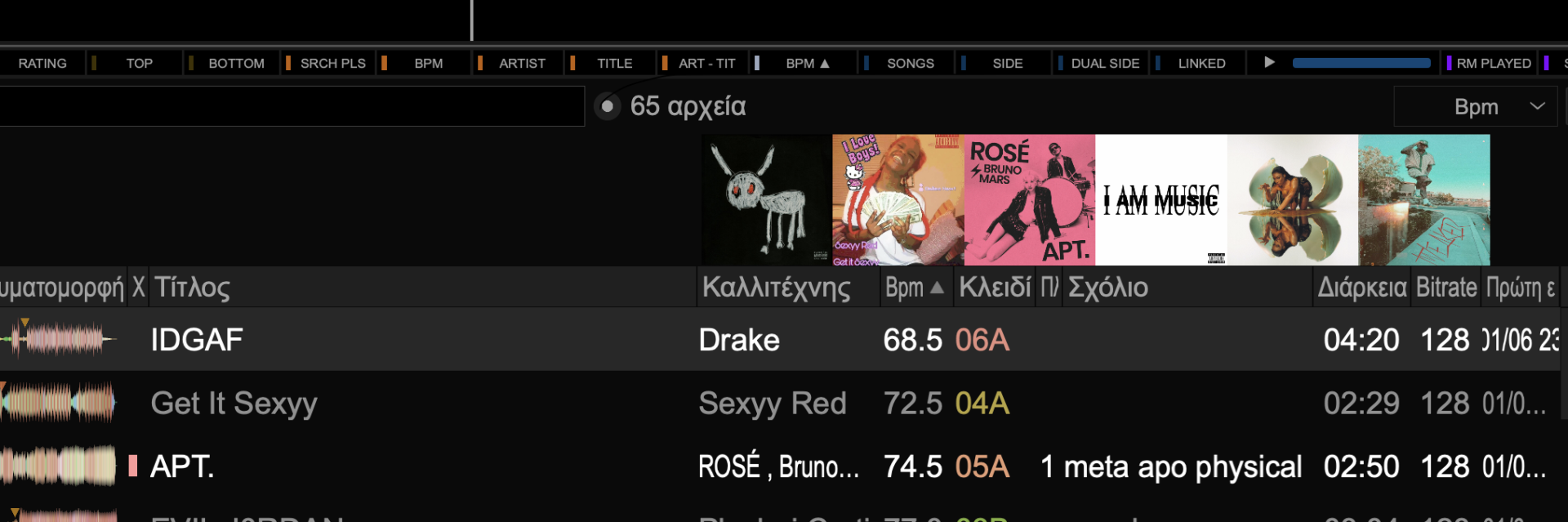
Note, it's not next to bpm etc that it always was, but on top.
Posted Mon 16 Mar 26 @ 1:49 pm
groovindj
It's called coverFlow in settings, or you can just drag it up and hide it.
Posted Mon 16 Mar 26 @ 2:08 pm
Dimitris Vlisidis
Thanks @groovinDj !
Another question, I would be supper thankful for your insight.
If I press shift and drag a song, it moves it from the browser to a selected folder on the left.
Is there a way, I can press another key and drag to a folder, so I can quick copy a song instead of moving it ?
Another question, I would be supper thankful for your insight.
If I press shift and drag a song, it moves it from the browser to a selected folder on the left.
Is there a way, I can press another key and drag to a folder, so I can quick copy a song instead of moving it ?
Posted Mon 16 Mar 26 @ 2:11 pm
PhantomDeejay
Hold CTRL button instead
(Typical Windows shortcut behavior... SHIFT+Drag=Move, Ctrl+Drag=Copy)
(Typical Windows shortcut behavior... SHIFT+Drag=Move, Ctrl+Drag=Copy)
Posted Mon 16 Mar 26 @ 2:29 pm