


 Man-Tk
hI :
I have all my hot cue leds in green using my vestax vci300 ... with itch hot cue 1 is red - 2 blue and 3 yellow ... can we do something ?
Thanks :
Man-Tk
I have all my hot cue leds in green using my vestax vci300 ... with itch hot cue 1 is red - 2 blue and 3 yellow ... can we do something ?
Thanks :
Man-Tk
Posted Wed 11 Nov 09 @ 7:26 pm
 Rune (DJ-In-Norway)
I'll remake for colors ;)
will upload tomorrow
Posted Wed 11 Nov 09 @ 7:41 pm
Man-Tk
Thanks .... It would be good to know how to do it also ....thanks again
Posted Thu 12 Nov 09 @ 3:04 am
Man-Tk
This is not a hardware question !
Posted Sun 15 Nov 09 @ 6:20 am
 jakovski
Should be an easy thing. Go to your mapper settings of the vci-300. Enter a action for all the 'GREEN' leds in the list with 'nothing'.
Then select the correct LED (for example in 'BLUE') and enter the correct action for lightning up.
For example:
'hot_cue 1' for the LED in RED.
(Take a look in the List - there are all the VCI Elements, also all the different colors of the leds)
Greets, Heiko
Then select the correct LED (for example in 'BLUE') and enter the correct action for lightning up.
For example:
'hot_cue 1' for the LED in RED.
(Take a look in the List - there are all the VCI Elements, also all the different colors of the leds)
Greets, Heiko
Posted Sun 15 Nov 09 @ 10:18 am
Man-Tk
Ok ...done ...thanks
Posted Mon 16 Nov 09 @ 1:29 pm
jakovski
Did it work like you wanted it ?
Greets, Heiko
Greets, Heiko
Posted Mon 16 Nov 09 @ 2:47 pm
 acw_dj
Yes I saw him post it on spanish forum that he could map as he want, thanks Heiko ;-) I'm sure he is going to tell here by himself, just want you to know.
Posted Tue 17 Nov 09 @ 12:50 am
Man-Tk
jakovski wrote :
Did it work like you wanted it ?
Greets, Heiko
Greets, Heiko
Yes , thanks ...all is OK now ...
BTW : I don't know who moves this post to here ...because this is not a hardware issue -
Posted Tue 17 Nov 09 @ 7:15 am
 cioce
cioce
It's an hardware discussion and general forum it's like a recycle bin sometimes, just to clean some topics...
Anyway your mapper is now available ;)
https://virtualdj.com/addons/9700/Vestax_VCI-300_with_correct_LED_mapper.html
Anyway your mapper is now available ;)
https://virtualdj.com/addons/9700/Vestax_VCI-300_with_correct_LED_mapper.html
Posted Tue 17 Nov 09 @ 7:38 am
 discobrian24
Dont know who moved it, but isnt a VCI300 a piece of hardware?? And u were askin questions about it??? I dunno:)
Posted Wed 18 Nov 09 @ 4:28 am
 sirkitbreaker
right it fits here cause i wouldnt of found it anywhere else following that same logic as above
Posted Fri 20 Nov 09 @ 12:10 pm
 DJ Cyder
the mapper fixes the led's but breaks the crossfader lol, I'll upload a better one later.
Posted Fri 20 Nov 09 @ 9:34 pm
Man-Tk
DJ Cyder wrote :
the mapper fixes the led's but breaks the crossfader lol, I'll upload a better one later.
The crossfader is disabled . Sorry .
Posted Sat 21 Nov 09 @ 3:36 am
cioce
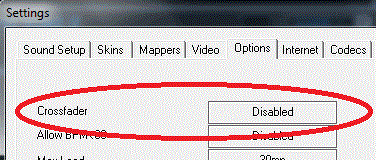
VDJ can disable the crossfader without to delete from mapper, just in case you don't know...
Posted Sat 21 Nov 09 @ 7:38 am
Man-Tk
I have the crossfader for video . not audio ...thanks
Posted Sat 21 Nov 09 @ 8:40 am
 jpboggis
You can also do that without modifying a mapper - Set Options -> Crossfader to Disabled and tick Video -> Video crossfader linked to audio. Now the crossfader will act as a video crossfader only.
Posted Sat 21 Nov 09 @ 2:09 pm